
This document is an introductory guide for the installation and configuration of AX411 Access Point. It provides instructions on how to install the access point and how to connect it to an SRX series services gateway for configuration.
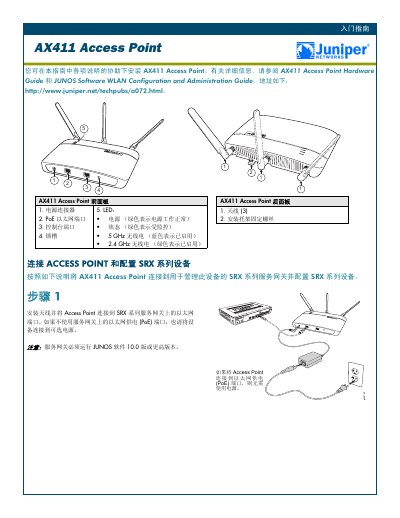
The Juniper AX411 Access Point User Guide provides step‑by‑step instructions for installing the device, connecting it to a Juniper SRX series service gateway, and performing basic configuration such as licensing, IP addressing, and security zone assignment.
Key sections cover hardware identification (front and rear panels), LED status indicators, antenna installation, PoE versus optional power, license requirements for multiple APs, and verification of WLAN connectivity using the default SSID and security settings.
| Power connector | Present |
|---|---|
| PoE Ethernet port | Present |
| Console port | Present |
| LED indicators | Power (green), Status (green), 5 GHz radio (blue), 2.4 GHz radio (green) |
| JUNOS software requirement | Version 10.0 or higher |
Install the antenna and connect the Access Point to an Ethernet port on the SRX gateway; use PoE if available or an optional power supply otherwise.
An Access Point license must be installed on the SRX gateway; licenses are available for 2, 4, 8, or 16 APs.
Check that the Power and Status LEDs are green, the 5 GHz radio LED flashes blue, and the 2.4 GHz radio LED flashes green.