
This document is a user manual for CASIO watches. The watch has various functions, including stopwatch, thermometer, world time, etc. The design of the watch is simple and elegant, suitable for daily wear.
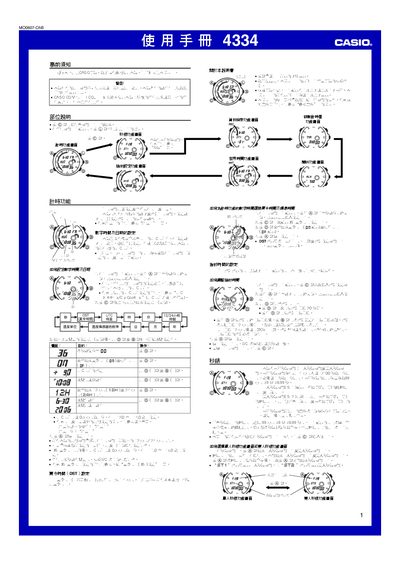
The guide provides step‑by‑step instructions for all functions of the Casio 4334 watch, including setting the digital and analog time, configuring world time, daylight saving, alarms, countdown timer, and automatic illumination. It also details how to use the single‑ and dual‑stopwatch modes, manage memory records, and calibrate the built‑in temperature sensor.
Safety warnings, battery‑saving tips, and troubleshooting advice are included, along with a reference section that lists UTC differentials for major cities and explains the watch’s automatic calendar and date handling. This manual is written in Chinese.
| Temperature range | -10.0°C to 60.0°C |
|---|---|
| Temperature unit | Celsius (℃) or Fahrenheit (℉) |
| Memory capacity | 50 records |
| Timer range | 1 minute to 100 hours |
| Automatic illumination duration | ≈6 hours |
Enter the time‑setting screen by holding the A button until the seconds flash, then use the C button to select the field and the D (+) / B (–) buttons to adjust the value.
The watch can store up to 50 stopwatch records in its memory.
Hold the D button for about 3 seconds on any function screen to toggle automatic illumination on or off.