
Key facts
- Manuals
- 3
- Languages
- EN
- Last added
- 2012-05-03
Featured Meilhaus manuals
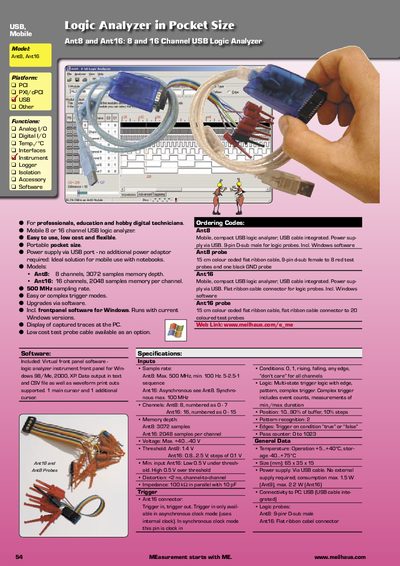
Meilhaus Ant8/Ant16 Pocket‑Size USB Logic Analyzer Product Leaflet
The Ant8 and Ant16 are pocket‑size USB logic analyzers designed for professionals, educators, and hobbyists. They connect via an integrated USB cable and include Windows front‑panel software for data capture and analysis.
Key features include up to 500 MHz sample rate, multi‑state trigger logic, configurable memory depth (3072 samples for Ant8, 2048 per channel for Ant16), and optional low‑cost test probe cables. The devices operate from USB power only, require no external adapter, and provide voltage thresholds, temperature ranges, and impedance specifications suitable for a wide range of digital test applications.
Covers: Model · Platform · Functions · Ordering Code · Software Specifications · Inputs
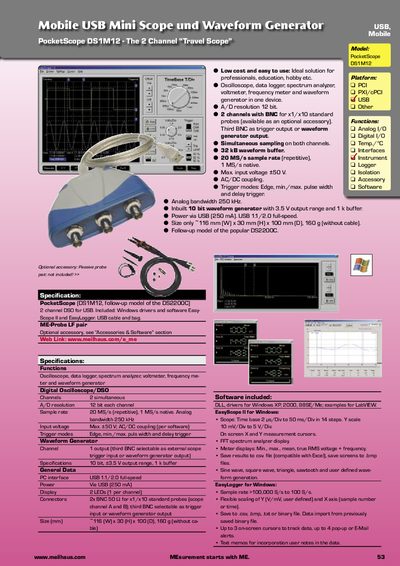
Meilhaus PocketScope DS1M12 USB Oscilloscope User Manual
The PocketScope DS1M12 is a compact USB‑powered digital storage oscilloscope offering two simultaneous channels, a 250 kHz analog bandwidth, and a 10‑bit waveform generator with a 3.5 V output range. It provides functions such as oscilloscope, data logger, spectrum analyzer, voltmeter, frequency meter and waveform generation in a single device.
The unit includes Windows drivers and Easy‑Scope/Easy‑Logger software, a USB cable and a carrying bag. Optional accessories include a passive probe pair. Physical dimensions are about 416 mm × 30 mm × 100 mm and it weighs roughly 160 g. Power is supplied via USB (up to 250 mA).
Covers: Functions · Specifications · Software · Accessories · Physical Dimensions · Power
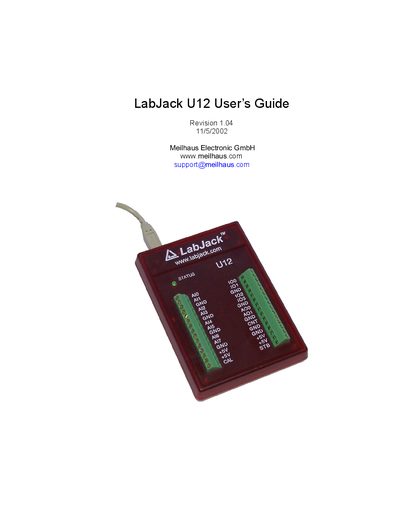
LabJack U12 User Manual
The guide explains how to install the LabJack U12 on Windows 98SE, ME, 2000, or XP, including hardware connection via the supplied USB cable and software installation of high‑level drivers and the NI LabVIEW Run‑Time Engine. It also details troubleshooting steps for enumeration failures and how to verify successful device detection using the status LED.
The manual describes the hardware features such as the USB connector, DB25 digital I/O connector, status LED, and 30 screw terminals. It covers analog input configuration, resolution, gain settings, and provides a programming reference with function calls for data acquisition and control. A specifications section lists electrical and environmental parameters of the device.
Covers: Installation · Hardware Description · Example Applications · Programming Reference · Specifications
Latest Meilhaus manuals
Meilhaus Ant8/Ant16 Pocket‑Size USB Logic Analyzer Product Leaflet
Product Leaflet 1 pages · 234 KB · ENThe Meilhaus Ant8 and Ant16 are compact USB logic analyzers offering 8 or 16 channels, up to 500 MHz sampling, and integrated Windows software.
Meilhaus PocketScope DS1M12 USB Oscilloscope User Manual
User Manual 1 pages · 186 KB · ENThe Meilhaus PocketScope DS1M12 is a USB‑powered 2‑channel oscilloscope with built‑in waveform generator and data‑logging features.
LabJack U12 User Manual
User Manual 45 pages · 2.4 MB · ENThe LabJack U12 User Manual provides installation steps, hardware description, and programming reference for this USB measurement device.
Which document do I need?
User Manual
Day-to-day operation, settings and troubleshooting. Start here if the product is already set up.
Questions answered in Meilhaus manuals
What is the maximum sampling rate of the Ant8?
The Ant8 can sample at a maximum rate of 500 MHz.
From: Meilhaus Ant8/Ant16 Pocket‑Size USB Logic Analyzer Product Leaflet
How is the device powered?
Power is supplied via the USB cable; no external adapter is required.
From: Meilhaus Ant8/Ant16 Pocket‑Size USB Logic Analyzer Product Leaflet
What is the maximum sample rate of the PocketScope DS1M12?
The device can sample at up to 20 MS/s in repetitive mode and 1 MS/s natively.
From: Meilhaus PocketScope DS1M12 USB Oscilloscope User Manual
What powers the PocketScope DS1M12?
The unit is powered via USB, drawing up to 250 mA.
From: Meilhaus PocketScope DS1M12 USB Oscilloscope User Manual
Which Windows operating systems are supported for the LabJack U12?
The LabJack U12 works with Windows 98SE, Windows ME, Windows 2000, and Windows XP.
From: LabJack U12 User Manual
How can I tell if the LabJack U12 has been successfully enumerated?
When enumeration is complete the status LED blinks twice and then stays on.
From: LabJack U12 User Manual