
Key facts
- Manuals
- 16
- Languages
- EN · ZH
- Last added
- 2026-09-30
Featured DS manuals
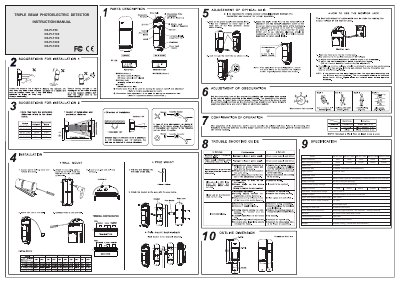
DS DS-PI-T50/DS-PI-T100/DS-PI-T150/DS-PI-T200/DS-PI-T250 Triple Beam Photoelectric Detector Instruction Manual
This manual describes the DS triple‑beam photoelectric detectors, which detect objects by interrupting three simultaneous infrared beams. It lists the detection distances, beam angles, power requirements, and output functions for each model.
Installation steps, optical‑axis adjustment, shading‑time settings, and detailed troubleshooting procedures are included to help users set up the detectors correctly and maintain reliable operation in various environments.
Covers: Technical Specifications · Installation Instructions · Optical Axis Adjustment · Shading Time Adjustment · Alarm Output · Power Supply
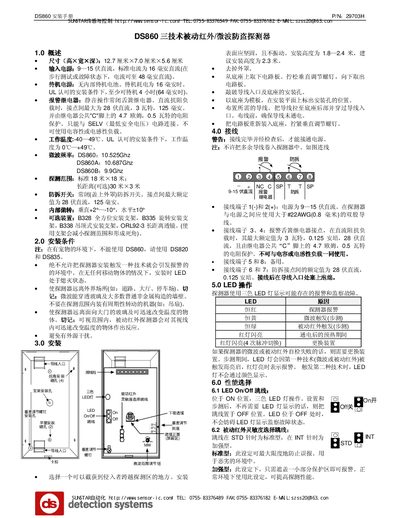
Sunstar DS860 Security Detector Installation Guide
The DS860 is a passive infrared and microwave security detector designed for intrusion detection. It operates on 9‑15 V DC and includes an alarm relay, anti‑tamper switch, and three‑color LED status indicator.
The guide covers product specifications, installation conditions, step‑by‑step mounting, wiring diagrams, LED operation, performance selection, walk‑test setup, monitoring functions, routine maintenance, and how to adjust detection range for standard and long‑distance configurations. This manual is written in Chinese.
Covers: Overview · Installation Conditions · Installation Procedure · Wiring · LED Operation · Performance Selection
SUNSTAR CC406H Installation Guide
This guide explains how to install and configure the SUNSTAR CC406H security control panel. It covers technical specifications, wiring, programming methods, arming modes, bypass zones, and troubleshooting.
Key sections include technical specifications, programming via keyboard or remote, normal and forced arming, perimeter (STAY) mode, factory reset procedures, installer commands, and special functions such as fault analysis and test report generation. This manual is written in Chinese.
Covers: Technical specifications · Programming · Factory reset · Normal arming (AWAY) · Forced arming · Perimeter arming (STAY)
Sunstar CC880 Installation Guide
The Sunstar CC880 is a control host used in security and alarm systems. It stores programming data in an EPROM that retains information for up to 10 years without power.\n\nThe guide covers power‑up, entering installer mode, default master and installer passwords, zone preset configuration, key functions, programming address layout, and wiring diagrams. It also explains how to set the system time, date, and telephone numbers, and how to exit installer mode. This manual is written in Chinese.
Covers: Quick Start Procedure · Zone Pre‑settings · Key Functions · Programming Directory · Component Diagram · Keyboard Connection
Latest DS manuals
DS DS-PI-T50/DS-PI-T100/DS-PI-T150/DS-PI-T200/DS-PI-T250 Triple Beam Photoelectric Detector Instruction Manual
User Manual 2 pages · 10.1 MB · ENThe DS instruction manual provides installation, operation, specifications, and troubleshooting for the DS-PI-T50, T100, T150, T200, and T250 triple‑beam…
DS Europe MR 400 series technology data
DS Europe HC 2000 series technology data
The HC 2000 series are circular load cells with a central hole, which supply an electrical signal proportional to the force applied in their axial direction. These washers find application for the indication and for the automatic control and feedback of axial thrusts static and dynamic on punching machines, on machine tools, on presses, on power hammers installed directly or, better, through a thrust spherical plane bearing. Main constructive peculiarities: • Low profile, compactness, high strength, easiness of installation. • Central hole diameter: large, for standard metric shafts and screws. • Internal sensors and electrical circuits: entirely stuffed by water-repellent and high insulating silicon filler. • Internal calibration: to allow a simple calibration of the complete system by the User.
DS Europe LD1 LD5 LD10 LD100 LD300 technology data
The LD-LT series thin type load cells are characterized by high accuracy, high stability and are widely used in industry, mechanical equipment, actuators, weighing systems, water tanks, etc.
DS 4 electronic pressure Switch Manual
This manual introduces the basic function and usage of the electronic pressure switch DS 4.
DS 6 electronic pressure Switch Manual
This is the operation manual for electronic pressure switch DS6 produced by BD SENSORS CHINA. It includes product features, usage, installation and other instructions.
DS 200/DS 200 P/DS 201/DS 201 P/DS 210 electronic pressure Switch series Manual
This manual introduces the features and usage methods of the DS 2XX series of electronic pressure switches
DS 8000C Manual
DS8000C is a high-quality digital copier that can be upgraded to a high-quality digital copier by connecting to an existing laser printer. The product has copy function, automatic paper feed function, simple operation panel and LCD display screen.
DS Europe-BC300- technology data(German)
BC304 and BC305 crown the series BC300 in the higher measuring ranges: the cell BC304 for compression; the cell BC305 for tension and compression. These button load cells find applications for general purpose on machines, where the very low profile and the extreme compactness are important; moreover their small dimensions and easy construction bring them competitive compared to other larger cells with the same measuring ranges.
DS Europe-CELL_V02- technology data(German)
This document is about the installation and use of LOAD CELL Mod. S/N For series: 500QD- 560QDT – QB700 –LD – LT – HC 2000 – BC 300 - MD 5000 – MB 400 – MR 400 – AP 7000 – ME – MF – 942 (Liftsentry) – 922 LCR 200 – EG – MB490- MP - PT500- KCI DS Europe. The document includes cautions for installation and use, steps for mechanical installation and electrical connections, as well as tests for the application of the CE mark.
DS Europe-ShortForm technology data(German)
dslab is a multi-channel data acquisition system including transducers that measure (forces, displacements, temperatures, etc.) and transmitting analog signals to the SAP digitizing electronics that retransmits, the measured values, by means of CAN Open, to a CAN/USB converter connected to the computer USB, where DSLab software is installed. dslab data acquisition software shows, at the same time, all wave forms of each input channel on the computer screen where it is possible a data analysis, to save data on hard disk and to print graphs.
Sunstar DS860 Security Detector Installation Guide
Installation Guide 3 pages · 324 KB · ZHThe Sunstar DS860 installation guide provides specifications, wiring instructions, LED operation, performance settings, maintenance tips, and detection…
SUNSTAR CC406H Installation Guide
Installation Guide 20 pages · ZHThe SUNSTAR CC406H Installation Guide provides step‑by‑step instructions for wiring, programming, arming, disarming and maintenance of the control unit.
Sunstar CC880 Installation Guide
Installation Guide 20 pages · ZHStep‑by‑step installation and programming guide for the Sunstar CC880 control host.
ds DS7240 service manual
Which document do I need?
User Manual
Day-to-day operation, settings and troubleshooting. Start here if the product is already set up.
Installation Guide
Mounting, wiring and first power-up. Read it before the hardware goes in.
Questions answered in DS manuals
What is the recommended power supply voltage?
The detector should be powered with DC 12 V or 24 V, without polarity restriction.
What should be checked if the alarm indicator stays on continuously?
Verify the optical‑axis adjustment, remove any obstacles between transmitter and receiver, and clean the optical parts.
What input voltage and current does the DS860 require?
It requires 9–15 V DC with a standard current of 16 mA, which can rise to 48 mA during a walk test or fault condition.
What are the operating temperature limits of the DS860?
The detector operates from –40 °C to 49 °C, and under UL‑approved conditions from 0 °C to +49 °C.
How can the CC406H be restored to factory settings?
Use installer mode with the installer password and enter +A W A Y +961+ AWAY, or short JP2 on the board after power is removed.
How do you arm the system in normal (AWAY) mode?
Enter the user password and press the AWAY key; the system will emit two beeps and the AWAY indicator will light.