
Key facts
- Manuals
- 6
- Languages
- ZH · EN
- Last added
- 2026-10-25
Featured Phanteks manuals

PHANTEKS NV7 Chassis User Manual
The PHANTEKS NV7 is a full-tower "sea view" chassis designed for component display and high-density cooling. It features seamless tempered glass panels on the front and sides, a high-density cooling panel, and an integrated D-RGB lighting system controlled by four buttons on the top of the chassis.
The document details the complete assembly process, including removing external panels, installing the motherboard, power supply, and fans/radiators. It also covers cable management options, such as using a cable comb or silicone grommets, and provides specific technical specifications for supported components and airflow configurations. This manual is written in Chinese.
Covers: Introduction · Specifications · Removing External Panels · Motherboard Installation · Power Supply Installation · Fan and Radiator Installation
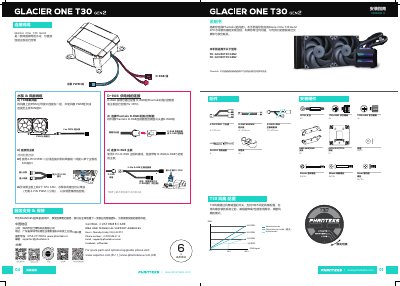
Phanteks Glacier One T30 Gen2 CPU Water Cooler Installation Guide
This manual guides users through the installation of the Phanteks Glacier One T30 Gen2 CPU water cooler. It covers essential steps including fan configuration, mounting the radiator and pump, and connecting cables to the motherboard. The guide is applicable to models PH-GO240T30 GEN2 and PH-GO360T30 GEN2. This manual is written in Chinese.
Covers: Fan Configuration · Cable Connections · D-RGB Control · Mounting Preparation · Radiator Installation · Pump Installation
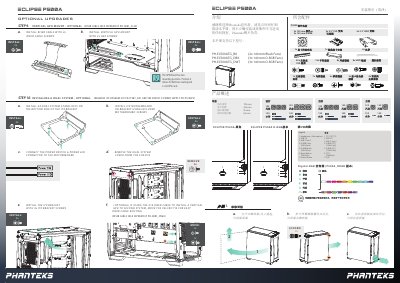
Phanteks ECLIPSE P500A Installation Guide
The document serves as an installation guide for the Phanteks ECLIPSE P500A chassis. It details the removal of panels, installation of the motherboard, power supply, storage drives (2.5" SSDs and 3.5" HDDs), and optional vertical GPU mounting. The guide includes specific steps for connecting front I/O headers and SATA cables. This manual is written in Chinese.
Covers: Product Overview · Included Accessories · Panel Removal · Motherboard Installation · Power Supply Installation · Storage Installation (SSD/HDD)
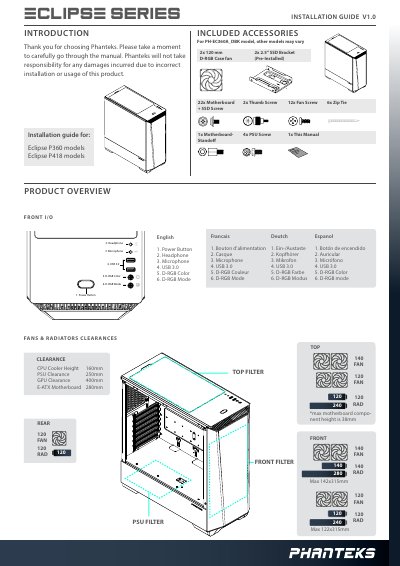
Phanteks Eclipse P360/P418 Chassis User Manual
This manual provides installation instructions for the Phanteks Eclipse P360 and P418 chassis. It details the included accessories, such as fans, filters, and mounting hardware, and specifies clearances for CPU coolers, GPUs, and power supplies. The guide covers the installation of the motherboard, power supply, and storage drives.
Covers: Product Overview · Included Accessories · Panel Removal · Hardware Installation · Cable Connection · Digital-RGB Control
Latest Phanteks manuals
PHANTEKS NV7 Chassis User Manual
User Manual 18 pages · 3.3 MB · ZHThis manual provides installation instructions, specifications, and D-RGB lighting control information for the PHANTEKS NV7 full-tower chassis.
Phanteks Glacier One T30 Gen2 CPU Water Cooler Installation Guide
User Manual 2 pages · 6.8 MB · ZHInstallation guide for the Phanteks Glacier One T30 Gen2 CPU water cooler, covering fan configuration, mounting, and cable connections for AMD and Intel…
Phanteks ECLIPSE P500A Installation Guide
User Manual 2 pages · 4.4 MB · ZHThis manual provides installation instructions for the Phanteks ECLIPSE P500A computer case, covering component mounting, cable connections, and D-RGB…
Phanteks Eclipse P360/P418 Chassis User Manual
User Manual 4 pages · 2.1 MB · ENInstallation and setup guide for the Phanteks Eclipse P360 and P418 computer chassis, covering component installation, panel removal, and RGB control.
Phanteks Eclipse P400S Case User Manual
User Manual 13 pages · 7 MB · ENThis manual provides installation and usage instructions for the Phanteks Eclipse P400S computer case, covering specifications, component installation, and…
Phanteks Universal Fan Controller User Manual
User Manual 2 pages · 139 KB · ENThis manual covers the installation and operation of the Phanteks Universal Fan Controller, a device supporting PWM and DC signals with remote control…
Which document do I need?
User Manual
Day-to-day operation, settings and troubleshooting. Start here if the product is already set up.
Questions answered in Phanteks manuals
How do I control the D-RGB lighting?
There are four buttons on the top of the chassis to control the D-RGB lighting effects.
How do I turn off the D-RGB lights?
Hold the mode button for two seconds to turn off the lights.
Which models does this manual cover?
This manual is applicable to the PH-GO240T30 GEN2 and PH-GO360T30 GEN2 models.
From: Phanteks Glacier One T30 Gen2 CPU Water Cooler Installation Guide
How do I configure the fan modes?
You can adjust the fan mode via a switch on the back of the fan before installation to select Noise, Performance, or Hybrid mode.
From: Phanteks Glacier One T30 Gen2 CPU Water Cooler Installation Guide
Does the Phanteks ECLIPSE P500A support D-RGB lighting?
Yes, but only on specific models. The text distinguishes between standard and D-RGB versions.
Is the riser cable included with the case?
No, the manual states that the riser cable is sold separately.