
Key facts
- Manuals
- 9
- Languages
- ZH · EN
- Last added
- 2026-11-01
Featured Ezviz manuals

Ezviz Smart Life Device User Manual
This user manual covers the basic usage of the Ezviz smart life device. It details the contents of the package, describes the device appearance, and explains how to charge the unit and insert a Nano SIM card (supporting China Mobile and China Unicom). This manual is written in Chinese.
Covers: Package Contents · Device Appearance · Charging · Inserting SIM Card · Power On/Off · Touch Screen Gestures

Ezviz X1 Internet Camera Quick Start Guide
This document serves as a quick start guide for the Ezviz X1 internet camera. It details the unboxing contents, physical appearance, and initial setup procedures including connecting the device to a Wi-Fi network via the Ezviz Cloud Video client. The guide also covers basic installation methods for mounting the device on a wall or metal surface. This manual is written in Chinese.
Covers: Unboxing · Appearance · Operation · Installation · Features · Ezviz Cloud
Ezviz T30 Smart Socket User Manual
The Ezviz T30 is a smart socket designed to be controlled remotely. The device features an on/off switch and status indicator lights (red for power state, blue for network connection). Users can control the socket by short-pressing or long-pressing the button on the device. This manual is written in Chinese.
Covers: Packaging List · Appearance Introduction · App Installation · Connection Steps · Technical Specifications · After-sales Service
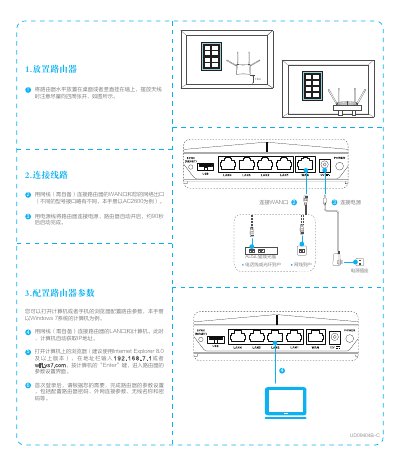
Ezviz UD09404B Router User Manual
The Ezviz UD09404B is a wireless router designed for home use, supporting connections via ADSL or fiber optic lines. The device features a web-based configuration interface accessible at 192.168.7.1 or wifi.ys7.com, allowing users to set up passwords, internet connection parameters, and wireless settings. This manual is written in Chinese.
Covers: Hardware Installation · Connecting Cables · Web Configuration · Ezviz Cloud App · One-Click Access · Anti-Theft Network
Latest Ezviz manuals
Ezviz Smart Life Device User Manual
User Manual 14 pages · 1.6 MB · ZHThis manual provides operating instructions for Ezviz smart life devices, including charging, SIM card insertion, screen gestures, and app setup.
Ezviz X1 Internet Camera Quick Start Guide
Quick Start Guide 14 pages · 1.2 MB · ZHThis quick start guide provides installation instructions, operation steps, and troubleshooting for the Ezviz X1 internet camera.
Ezviz T30 Smart Socket User Manual
User Manual 12 pages · 570 KB · ZHThis user manual for the Ezviz T30 smart socket covers installation, Wi-Fi configuration via the Ezviz Cloud app, technical specifications, and warranty…
Ezviz UD09404B Router User Manual
User Manual 4 pages · 558 KB · ZHThis manual provides instructions for installing, configuring, and troubleshooting the Ezviz UD09404B router, including setup via the Ezviz Cloud app.
Ezviz UD10753B Internet DVR User Guide
User Manual 2 pages · 660 KB · ZHThis user guide covers the unpacking, installation, operation, and configuration of the Ezviz UD10753B internet video recorder.
Ezviz C3C Wall-Mounted Internet Camera Quick Start Guide
User Manual 16 pages · 1.2 MB · ZHThis quick start guide for the Ezviz C3C wall-mounted internet camera covers unboxing, installation, power connection (AC/PoE), Wi-Fi configuration, and…
Ezviz Smart Feeder User Manual
User Manual 22 pages · 1.5 MB · ZHThis manual provides operating instructions, safety warnings, and troubleshooting guides for the Ezviz smart pet feeder.
EZVIZ Network Cameras User Manual
User Manual 117 pages · 8.1 MB · ENUser guide for EZVIZ network cameras covering login, network setup, image/audio configuration, and intelligent alarm features.
Ezviz S1 Internet Sports Camera User Manual
User Manual 50 pages · 5.3 MB · ZHThis manual provides instructions for unpacking, charging, operating, and setting up the Ezviz S1 internet sports camera via the Ezviz Motion APP.
Which document do I need?
User Manual
Day-to-day operation, settings and troubleshooting. Start here if the product is already set up.
Quick Start Guide
The shortest path to a working setup, usually only a few pages.
Questions answered in Ezviz manuals
Can the device answer all phone calls?
No, the device has a whitelist to filter out harassment calls. Parents can create and save a whitelist via the Ezviz Cloud Video app.
Why does the Ezviz Cloud Video app show the device is offline?
The device is not connected to the network. Check if the Nano SIM card is correctly placed, activated, and has data traffic.
How do I reset the device to default settings?
Press and hold the RESET key for 3 seconds while the device is running normally.
Can I use a power bank to power the device?
It is not recommended; please use the Ezviz power adapter for stable power.
What does a red indicator light mean?
A constant red light indicates that the socket is powered on.
How long does it take for the socket to start up?
The startup time is less than 30 seconds.