
Key facts
- Manuals
- 5
- Models
- 1
- Languages
- ZH
- Last added
- 2026-11-04
Alotcer models by category
Featured Alotcer manuals

Alotcer AD7028S IP Modem User Manual
The Alotcer AD7028S is an industrial-grade embedded IP Modem designed for IoT wireless data transmission. It supports 2G, 3G, and 4G networks from major carriers and features a robust 32-bit communication processor. The device is suitable for applications in smart power grids, M2M industries, and other scenarios requiring high reliability and wide temperature operation (-35~+75°C). This manual is written in Chinese.
Covers: Product Introduction · Product Features · Product Specifications · Installation and Cabling · Power Description · LED Indicator Description
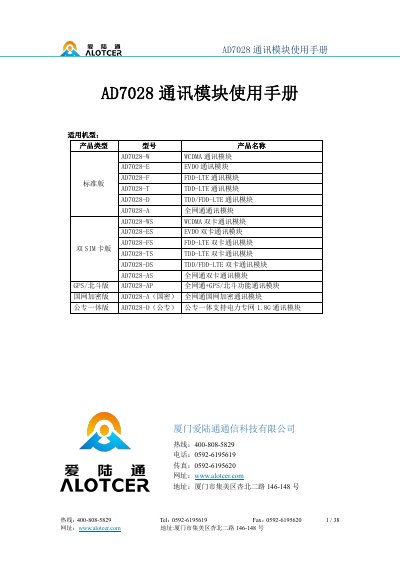
Alotcer AD7028 Communication Module User Manual
This manual covers installation, configuration, and operation of the AD7028 communication module, which supports various cellular networks including WCDMA, EVDO, and LTE. It features dual RS232/RS485 ports, Ethernet, and supports dual SIM cards, GPS/BD, and power grid encryption. The module is designed for industrial applications with wide temperature and voltage ranges.
The guide includes setup instructions for network parameters, security, VPN, and system management, along with detailed specifications for hardware, interfaces, and environmental conditions. This manual is written in Chinese.
Covers: Product Introduction · Product Installation · Parameter Configuration · Network Settings · Security · VPN
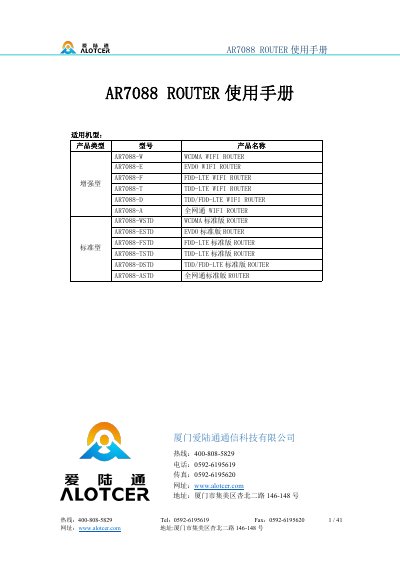
Alotcer AR7088 Router User Manual
This user manual provides step-by-step instructions for installing and configuring the Alotcer AR7088 router. It covers network setup, wireless settings, VPN configurations, security features, and system management. The router supports multiple cellular networks including 2G, 3G, and 4G, and includes features like MAC filtering, firewall, and DDNS support.
The manual also details hardware specifications such as CPU, memory, interfaces, and power requirements, along with troubleshooting and maintenance procedures for optimal performance. This manual is written in Chinese.
Covers: Product Introduction · Product Installation · Parameter Configuration · Network Basic · Network Advanced · Wireless Settings
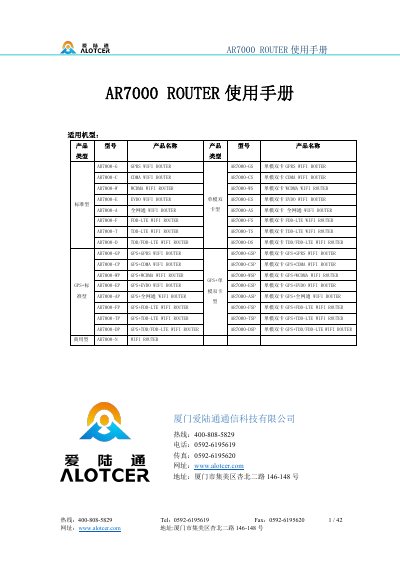
AloTcer AR7000 Series Router User Manual
This manual provides comprehensive instructions for the AloTcer AR7000 series of industrial routers, which support 2G, 3G, and 4G networks along with WiFi capabilities. The device is designed for M2M applications in industries such as power, transportation, and smart buildings, featuring an industrial-grade 32-bit processor and metal casing. This manual is written in Chinese.
Covers: Product Introduction · Product Installation · Parameter Configuration · Network Basic Settings · Wireless Settings · VPN Configuration
Latest Alotcer manuals
Alotcer AD7028S IP Modem User Manual
User Manual 62 pages · 1.7 MB · ZHThis manual covers the installation, configuration, and operation of the Alotcer AD7028S industrial IP Modem for IoT applications.
Alotcer AD7028 Communication Module User Manual
User Manual 38 pages · 1.9 MB · ZHUser manual for Alotcer's AD7028 communication module supporting 2G/3G/4G networks and multiple interface options.
Alotcer AR7088 Router User Manual
User Manual 41 pages · 2.1 MB · ZHUser manual for Alotcer AR7088 router covering installation, network configuration, wireless settings, and system management.
AloTcer AR7000 Series Router User Manual
User Manual 42 pages · 1.5 MB · ZHUser manual for the AloTcer AR7000 series industrial routers, covering installation, configuration, and specifications for 2G/3G/4G WiFi devices.
Alotcer AD2000 IP Modem Specification Sheet
Datasheet 5 pages · 336 KB · ZHTechnical specification sheet for the Alotcer AD2000 series 2G/3G/4G IoT wireless data transmission terminal.
Which document do I need?
User Manual
Day-to-day operation, settings and troubleshooting. Start here if the product is already set up.
Datasheet
Ratings, dimensions and ordering codes, for selection and design work.
Questions answered in Alotcer manuals
What is the operating temperature range of the AD7028S?
The device operates normally within a wide temperature range of -35°C to +75°C.
How do I enter the command mode via BOOT?
Power on the device, input 32 capital 'C' characters, then input 'ALT' to enter command mode.
What networks does the AD7028 module support?
It supports 2G (GPRS/CDMA), 3G (WCDMA/HUUPA/HSPA+/CDMA 2000 1x EVDO), and 4G (TDD-LTE/FDD-LTE) networks from China Mobile, China Unicom, and China Telecom.
What are the power requirements for the module?
It operates on DC 5~60V, with a recommended voltage of 12VDC.
What networks does the AR7088 router support?
It supports 2G (GPRS/CDMA), 3G (WCDMA/HSPA+/CDMA 2000 1x EVDO), and 4G (TDD-LTE/FDD-LTE) networks from China Mobile, China Unicom, and China Telecom.
How do I configure the router's wireless settings?
You can configure basic settings, wireless security (WEP, WPA, WPA2), and wireless status through the web interface.