
Key facts
- Brand
- Supermicro
- Model
- C7Q67
- Category
- Motherboard
- Documents
- 2
- Languages
- ZH · EN
- Last added
- 2026-10-20
Start here
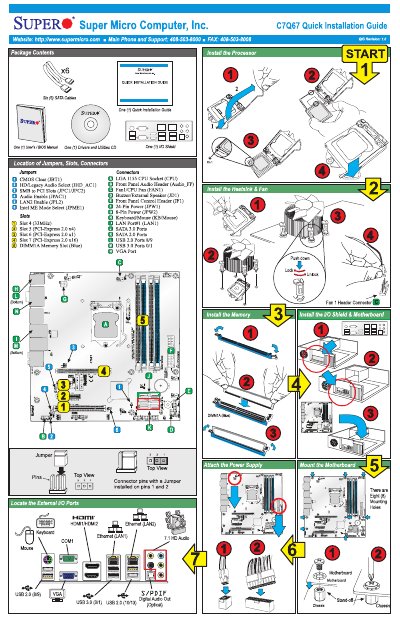
Supermicro C7Q67 Server Board Quick Installation Guide
This document serves as a quick installation guide for the Supermicro C7Q67 server board, chassis, and installed peripherals. It outlines essential safety instructions regarding electrical hazards, electrostatic discharge (ESD), and proper handling of hot components to prevent injury or equipment damage.
The guide provides step-by-step procedures for installing key components such as the processor, heat sink, fan, system memory, I/O shield, motherboard, and power supply. It also details site selection requirements, including environmental conditions like ventilation and grounding, to ensure optimal operation. This manual is written in Chinese.
Super Micro C7Q67 specifications
| Processor Support | Single 2nd generation Intel® Core™ i7/i5/i3 DT processor in LGA 1155 socket |
|---|---|
| Chipset | Intel® Q67 Express |
| Memory Support | DDR3 |
| SATA Connections | 6 SATA ports (I-SATA0~I-SATA5) |
Source: Super Micro C7Q67 User's Manual
All Super Micro C7Q67 documents by type
The shortest path to a working setup, usually only a few pages.
Day-to-day operation, settings and troubleshooting. Start here if the product is already set up.
Questions answered in these manuals
What safety precautions are required before opening the chassis?
You must turn off the system, disconnect all AC power cords and telecommunication lines, and retain all screws when removing access covers.
From: Supermicro C7Q67 Server Board Quick Installation Guide
How should one protect against electrostatic discharge (ESD)?
Perform procedures at an ESD workstation, wear an antistatic wrist strap attached to chassis ground, or handle boards only by their edges on a grounded surface.
From: Supermicro C7Q67 Server Board Quick Installation Guide
What processor does the C7Q67 support?
It supports a single 2nd generation Intel® Core™ i7/i5/i3 DT processor in an LGA 1155 socket.
How many SATA ports does the C7Q67 have?
It has 6 SATA ports labeled I-SATA0 through I-SATA5.