
Key facts
- Brand
- Redlion
- Model
- EtherTRAK-2
- Category
- Industrial Robot
- Documents
- 3
- Languages
- EN
- Last added
- 2023-10-16
Start here
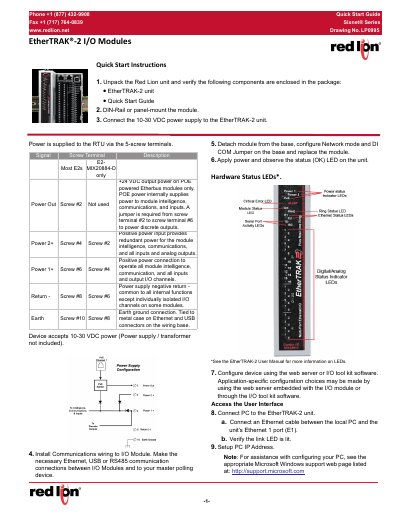
Red Lion EtherTRAK-2 I/O Modules Quick Start Guide
This document provides a quick start guide for the Red Lion EtherTRAK-2 I/O modules. It details the steps to unpack the unit, verify components, and mount the module on a DIN-rail or panel. The guide covers connecting the 10-30 VDC power supply and establishing communication wiring via Ethernet, USB, or RS485.
Read onlineRed Lion EtherTRAK-2 specifications
| Power Supply | 10-30 VDC |
|---|---|
| Subnet Mask | 255.0.0.0 |
| Hazardous Location Rating | Class I, Division 2 |
All Red Lion EtherTRAK-2 documents by type
The shortest path to a working setup, usually only a few pages.
Day-to-day operation, settings and troubleshooting. Start here if the product is already set up.
Questions answered in these manuals
How do I access the web server interface?
Open a web browser and enter 10.1.0.1 in the address bar.
What power voltage does the module accept?
The module accepts 10-30 VDC power.
What is the document revision?
The document is Revision A, dated September 2019.
From: Red Lion EtherTRAK-2 and Etherbus Dual Ethernet I/O Module Hardware Manual
What is the minimum IP rating required for an enclosure when using these products in ATEX hazardous locations?
A minimum IP54 rated enclosure is needed for ATEX unless an equivalent degree of protection is supplied by the location.
From: Red Lion EtherTRAK-2 and Etherbus Dual Ethernet I/O Module Hardware Manual
What software is used to configure the EtherTRAK2 modules?
Setup choices are entered using a web browser looking at the embedded web server within the module itself or the Sixnet I/O Tool Kit Windows software.
From: Red Lion EtherTRAK2 and Etherbus Dual Ethernet I/O Module User Manual
What are the general specifications for power supply voltage?
The general specifications apply a power supply voltage of 10 -30 VDC.
From: Red Lion EtherTRAK2 and Etherbus Dual Ethernet I/O Module User Manual