
Key facts
- Brand
- Onkyo
- Model
- TX-NR727
- Category
- Audio-Video Decoder
- Industry
- Electronics
- Documents
- 2
- Languages
- EN
- Last added
- 2026-11-08
Start here
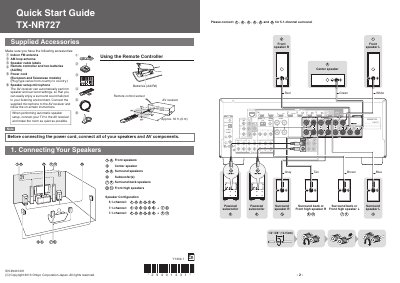
Onkyo TX-NR727 AV Receiver Quick Start Guide
This Quick Start Guide covers the initial setup process for the Onkyo TX-NR727 AV receiver, including connecting speakers and external components via HDMI or non-HDMI cables. It details how to use the supplied microphone for automatic speaker setup and explains how to configure the receiver using the on-screen Setup User Interface.
Read onlineOnkyo TX-NR727 specifications
| Power Supply Voltage | AC 230 V, 50 Hz or AC 120 V, 60 Hz |
|---|---|
| Ventilation Clearance | 20 cm (8") top and sides, 10 cm (4") rear |
| AC Fuse | Not user-serviceable |
All Onkyo TX-NR727 documents by type
Day-to-day operation, settings and troubleshooting. Start here if the product is already set up.
The shortest path to a working setup, usually only a few pages.
Questions answered in these manuals
What should I do if the Onkyo TX-NR727 cannot be turned on?
The AC fuse is not user-serviceable; contact your Onkyo dealer for assistance.
How much ventilation space does the TX-NR727 require?
Leave 20 cm (8 inches) of free space at the top and sides and 10 cm (4 inches) at the rear for proper airflow.
What is the default password for Bluetooth pairing?
The default password to enter when asked is 0000.
How many Bluetooth devices can the receiver save?
The AV receiver can save up to ten pairing information.