
Key facts
- Brand
- Mimaki
- Model
- CJV30
- Category
- Printer
- Industry
- Industrial
- Documents
- 3
- Languages
- PT · EN
- Last added
- 2026-11-22
Start here
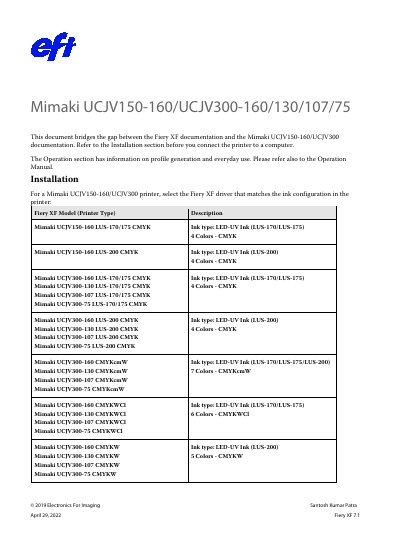
Mimaki UCJV150-160/UCJV300-160/130/107/75 Fiery XF 7.1 Printer Supplement
This document serves as a supplement to the Fiery XF documentation, bridging the gap between Fiery XF and Mimaki UCJV150-160/UCJV300 documentation. It provides instructions on selecting the appropriate Fiery XF driver based on the printer's ink configuration (LUS-170/175, LUS-200, CMYKcmW, etc.) and notes that the drivers are available for Windows only.
Read onlineMimaki CJV30 specifications
| Power supply | AC100 - 120V / 220 - 240V ±10% x2, 50/60Hz ±1Hz |
|---|---|
| Power consumption | 1440Wx2 |
| Usable temperature | 20°C to 30 °C |
| Relative humidity | 35 to 65% Rh (no condensation) |
| Main unit weight | 167 kg / 178 kg |
| External dimensions (W x D x H) | 2,525 x 700 x 1,392 mm / 2,775 x 700 x 1,392 mm |
Source: Mimaki CJV300 D500984-10 Inkjet Printer Installation Guide
All Mimaki CJV30 documents by type
Disassembly, diagnostics and part numbers, for repair.
Mounting, wiring and first power-up. Read it before the hardware goes in.
Day-to-day operation, settings and troubleshooting. Start here if the product is already set up.
Questions answered in these manuals
Can gasoline or thinner be used for cleaning?
No, avoid using gasoline, thinner, or chemicals containing abrasive components as they can degrade the cover surface.
What environment should the printer be used in?
The stated environment is 20 a 35ºC and 35 a 65% de umidade relativa.
What is the D500984-10 installation guide for?
It is a collection of information for service engineers when setting up Mimaki CJV300 inkjet printers.
From: Mimaki CJV300 D500984-10 Inkjet Printer Installation Guide
Which document is included with the product?
The Operation Manual is included with the product.
From: Mimaki CJV300 D500984-10 Inkjet Printer Installation Guide
Is Macintosh OS X supported for Mimaki UCJV printers?
No, Macintosh OS X is not supported for these printers.
From: Mimaki UCJV150-160/UCJV300-160/130/107/75 Fiery XF 7.1 Printer Supplement
What is the recommended mode for white ink printing during profile creation?
The recommended mode is 'Bounding box', which adds white to every pixel in the image rectangle.
From: Mimaki UCJV150-160/UCJV300-160/130/107/75 Fiery XF 7.1 Printer Supplement