
Key facts
- Brand
- Iridium
- Model
- 9555
- Industry
- Electronics
- Documents
- 2
- Languages
- ES · EN
- Last added
- 2026-10-27
Start here
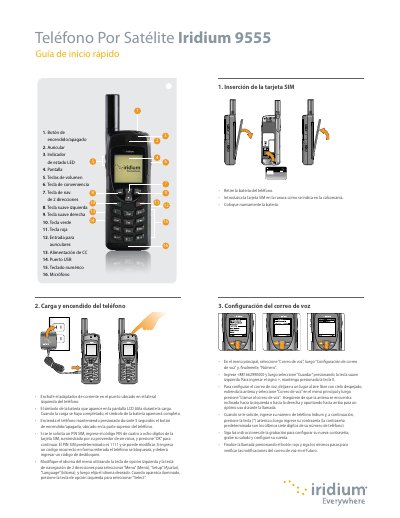
Iridium 9555 Satellite Phone Quick Start Guide
This document serves as a quick start guide for the Iridium 9555 satellite phone. It provides step-by-step instructions on how to charge and power on the device, insert the SIM card, and configure essential settings such as language and voice mail numbers.
The guide also details procedures for sending text messages (SMS) and making calls using the included antenna. Additional tips are provided regarding battery maintenance and optimal usage conditions in outdoor environments. This manual is written in Spanish.
All Iridium 9555 documents by type
The shortest path to a working setup, usually only a few pages.
Day-to-day operation, settings and troubleshooting. Start here if the product is already set up.
Questions answered in these manuals
How long must you hold the power button to turn on the phone?
You must hold the power button for 5 seconds to turn on the phone.
What is the default SIM PIN code?
The default SIM PIN code is 1111.
How do I insert the SIM card?
Insert the SIM Card as described in the Getting Started section.
Where can I find warranty and support information?
Warranty, Service and Support details are provided in the final chapter of the manual.