
Key facts
- Brand
- IBM
- Model
- xSeries 206 Type 8482
- Category
- Servers Computer
- Documents
- 2
- Languages
- EN
- Last added
- 2023-12-02
Start here
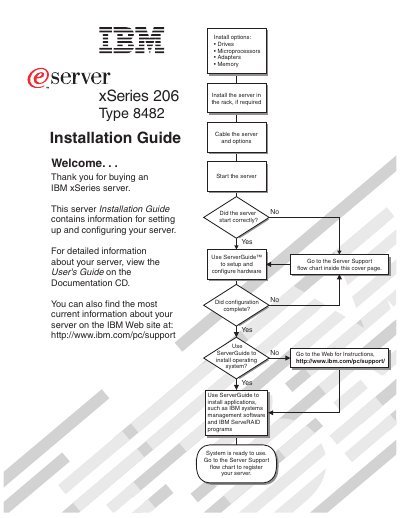
IBM xSeries 206 Type 8482 Server Installation Guide
This IBM xSeries 206 Type 8482 Installation Guide provides instructions for setting up and configuring the server. It covers cabling the server, starting the server, and installing options such as drives, microprocessors, adapters, and memory.
The guide also describes server controls, LEDs, and power features, configuration utilities, updating IBM Director, troubleshooting charts, diagnostic tools, and warranty and regulatory notices.
IBM xSeries 206 Type 8482 specifications
| Microprocessor | Intel Pentium 4 Processor |
|---|---|
| Maximum memory | 4 GB |
| Power supply | One 340 watt (90-240 V ac) |
| Weight | 16.3 kg to 20.8 kg |
| Video controller | ATI 7000M |
| PCI expansion slots | Two PCI-X 66 MHz/64-bit |
| Sound power operating | 5.5 bel |
All IBM xSeries 206 Type 8482 documents by type
Mounting, wiring and first power-up. Read it before the hardware goes in.
Questions answered in these manuals
What microprocessor does the IBM xSeries 206 server use?
It uses an Intel Pentium 4 Processor.
What is the maximum memory for the server?
The maximum memory is 4 GB.
What battery is specified for replacement?
Use only IBM Part Number 33F8354 or an equivalent type battery recommended by the manufacturer.
From: IBM xSeries 206 Type 8482 Server Option Installation Guide
Which bays are used for hot-swap SCSI hard disk drives?
Bays 5, 6, or 7.
From: IBM xSeries 206 Type 8482 Server Option Installation Guide