
Key facts
- Brand
- IBM
- Model
- Version 4
- Category
- Other Computer Accessories
- Industry
- Computers
- Documents
- 48
- Languages
- EN
- Last added
- 2026-10-26
Start here
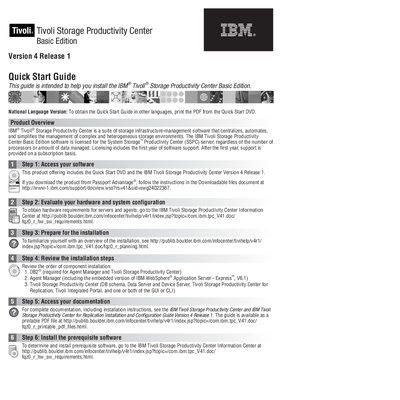
IBM Tivoli Storage Productivity Center Basic Edition Version 4 Release 1 Quick Start Guide
This Quick Start Guide is intended to help you install IBM Tivoli Storage Productivity Center Basic Edition, Version 4 Release 1. It opens with a product overview describing Tivoli Storage Productivity Center as a suite of storage infrastructure-management software that centralizes, automates and simplifies management of complex and heterogeneous storage environments. The Basic Edition is licensed for the System Storage Productivity Center (SSPC) server, regardless of the number of processors or amount of data managed, and licensing includes the first year of software support.
The guide then walks through seven steps: accessing the software from the Quick Start DVD or Passport Advantage, evaluating hardware and system configuration, preparing for installation, reviewing the order of component installation (DB2 first, then Agent Manager with the embedded WebSphere Application Server - Express V6.1, then Tivoli Storage Productivity Center components), accessing the documentation, installing prerequisite software and installing the product. It closes with links to additional technical resources and a note that a National Language Version of the guide can be printed from the Quick Start DVD.
IBM Version 4 specifications
| Product | IBM Print Services Facility for z/OS |
|---|---|
| Program number | 5655-M32 |
| Version | Version 4 Release 3 Modification 0 |
| Platform | z/OS |
Source: IBM Print Services Facility for z/OS Version 4 Release 3 User's Guide
All IBM Version 4 documents by type
Mounting, wiring and first power-up. Read it before the hardware goes in.
- IBM Z System Automation Service Management Unite Automation Installation and Configuration Guide Version 4.2 350 p
- IBM Tivoli Storage Productivity Center for Replication for System z Version 4.2.2.1 Installation and Configuration Guide 70 p
- IBM FileNet Image Services Version 4.2 Guidelines for Installing and Configuring Oracle Software on UNIX Servers (Site-Controlled) GC19-3300-00 85 p
- IBM Tivoli Netcool/System Service Monitors Version 4.0.1 Installation Guide 19 p
- IBM System Storage Master Console for SAN Volume Controller Version 4.1.0 Installation and User's Guide 83 p
- IBM Spectrum Scale Version 4 Release 2.3 Concepts, Planning, and Installation Guide 444 p
Day-to-day operation, settings and troubleshooting. Start here if the product is already set up.
- IBM Print Services Facility for z/OS Version 4 Release 1 User's Guide 289 p
- IBM Print Services Facility for z/OS Version 4 Release 3 User's Guide 311 p
- IBM FileNet Image Services Version 4.2 System Tools Reference Manual 1455 p
- IBM Tivoli Configuration Manager Version 4.2.2 Deployment Guide 417 p
- IBM Spectrum Scale Version 4 Release 2.3 Problem Determination Guide 722 p
- IBM Enterprise COBOL for z/OS Version 4 Release 2 Compiler and Runtime Migration Guide 418 p
- IBM Tivoli Storage FlashCopy Manager Version 4.1 Installation and User's Guide for UNIX and Linux 350 p
- IBM Print Services Facility for z/OS Version 4.7 User's Guide 317 p
- IBM Tivoli Storage Productivity Center for Replication for System z Version 4.2.2.2 User's Guide 258 p
- IBM Spectrum Scale Version 4 Release 2.0 Advanced Administration Guide 470 p
- IBM XIV Storage System Management Tools Version 4.6 Operations Guide 91 p
- IBM XIV Management Tools Version 4.8 Operations Guide 93 p
- IBM XIV Management Tools Version 4.6 XCLI Utility User Guide 29 p
- IBM Spectrum Scale Version 4 Release 2.0 Problem Determination Guide 362 p
- IBM FileNet Image Services Integral Single Document Storage Procedures and Guidelines Version 4.1.1 GC31-5535-02 168 p
- Enterprise COBOL for z/OS Compiler and Runtime Migration Guide, Version 4 Release 1 GC23-8527-00 418 p
- IBM FileNet Image Services Version 4.2 Enterprise Backup and Restore User's Guide 456 p
- IBM TRIRIGA Application Platform Version 4 Release 1 Connector for SAP BusinessObjects User Guide 62 p
- IBM Tivoli Netcool/OMNIbus Probe Integration for Juniper Contrail Alerts Version 4.1 Reference Guide 35 p
- IBM Tivoli Storage Productivity Center Version 4.2.2.3 Problem Determination Guide 118 p
- IBM Print Services Facility for z/OS Version 4.7 User's Guide 317 p
- IBM Tivoli Storage Productivity Center Version 4.1 User's Guide 878 p
- IBM Tivoli Storage FlashCopy Manager for Windows Version 4.1.4 Installation and User's Guide 420 p
- IBM System Storage SAN Volume Controller Master Console Guide Version 4.3.1 84 p
- IBM Tivoli Netcool/System Service Monitors Version 4.0.1 Software Administration Guide 191 p
- IBM System Automation for z/OS Version 4 Release 1 Monitoring Agent Configuration and User's Guide 269 p
- IBM System Automation for z/OS Version 4 Release 1 Product Automation Programmer's Reference and Operator's Guide 139 p
- IBM XIV Storage System Management Tools Version 4.3 Operations and Administration Guide 69 p
- IBM FileNet Image Services Version 4.2 System Tools Reference Manual 1455 p
- IBM System Automation for z/OS Version 4 Release 1 User’s Guide 279 p
- IBM Sterling Connect:Direct for UNIX User Guide Version 4.1 96 p
- IBM Parallel Environment for AIX 5L Messages Version 4 Release 3.0 Manual 134 p
Instruction set, parameters and examples for configuring or programming the device.
Disassembly, diagnostics and part numbers, for repair.
The shortest path to a working setup, usually only a few pages.
Questions answered in these manuals
What are the supported operating systems?
The document lists specific requirements for supported operating systems in Chapter 3, but does not enumerate them in the provided text.
How can I install IBM Service Management Unite Automation using Docker?
You can obtain installation files and proceed with the installation steps specifically designed for the Docker image method as described in Chapter 4.
What program number applies to IBM Print Services Facility Version 4 Release 1 Modification 0 for z/OS?
The program number is 5655-M32.
From: IBM Print Services Facility for z/OS Version 4 Release 1 User's Guide
In what mode does PSF act as an access method?
PSF acts as an access method in Direct-Printing Mode.
From: IBM Print Services Facility for z/OS Version 4 Release 1 User's Guide
What is PSF?
PSF is Print Services Facility, the IBM product introduced in this guide for z/OS.
From: IBM Print Services Facility for z/OS Version 4 Release 3 User's Guide
What program number is associated with Print Services Facility V4R3?
The guide lists Program Number 5655-M32 for Print Services Facility Version 4 Release 3 Modification 0 for z/OS.
From: IBM Print Services Facility for z/OS Version 4 Release 3 User's Guide