
Key facts
- Brand
- IBM
- Model
- Security Web Gateway Appliance Version 7.0
- Category
- Other network devices
- Documents
- 3
- Languages
- EN · JA
- Last added
- 2023-11-29
Start here
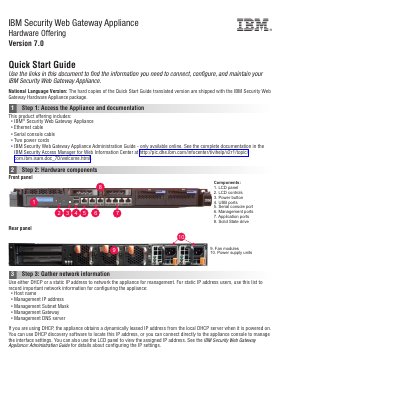
IBM Security Web Gateway Appliance Version 7.0 Quick Start Guide
The IBM Security Web Gateway Appliance Version 7.0 is a hardware offering designed for network security. This guide provides essential instructions for connecting, configuring, and maintaining the appliance, including details on the physical components and the initial setup process.
Users can configure the appliance using either the appliance console via a serial connection or the Local Management Interface (LMI) through a web browser. The guide outlines a six-step process from accessing documentation to completing the Appliance Setup wizard.
IBM Security Web Gateway Appliance Version 7.0 specifications
| Included Hardware | Ethernet cable, Serial console cable, Two power cords |
|---|---|
| Front Panel Components | LCD panel, LCD controls, Power button, USB ports, Serial console port, Management ports, Application ports, Solid State drive |
| Rear Panel Components | Fan modules, Power supply units |
Source: IBM Security Web Gateway Appliance Version 7.0 Quick Start Guide
All IBM Security Web Gateway Appliance Version 7.0 documents by type
The shortest path to a working setup, usually only a few pages.
Day-to-day operation, settings and troubleshooting. Start here if the product is already set up.
Questions answered in these manuals
What is the default password for the admin user?
The default password for the admin user is admin.
From: IBM Security Web Gateway Appliance Version 7.0 Quick Start Guide
How can I access the Appliance Setup wizard?
You can use the appliance console by connecting the serial console cable or use the Local Management Interface (LMI) in a web browser.
From: IBM Security Web Gateway Appliance Version 7.0 Quick Start Guide
Which IBM Security Access Manager release does this guide apply to?
It applies to version 7, release 0, modification 0 of IBM Security Access Manager (product number 5724-C87) and to all subsequent releases and modifications until otherwise indicated in new editions.
What is the document number for this configuration guide?
The document number is SC22-5433-01.
Which product does this configuration guide cover?
It covers the IBM Security Web Gateway Appliance Version 7.0 and explains configuration for the Web Reverse Proxy (WebSEAL).
From: IBM Security Web Gateway Appliance Version 7.0 Web Reverse Proxy Configuration Guide
Which appliance models are listed on the cover?
The cover lists models SV610000, SV620000 and SV630000.
From: IBM Security Web Gateway Appliance Version 7.0 Web Reverse Proxy Configuration Guide