
Key facts
- Brand
- GW
- Model
- GW621 GW626 GW631 GW636
- Category
- Industrial Robot
- Documents
- 2
- Languages
- ZH · EN
- Last added
- 2023-10-19
Start here
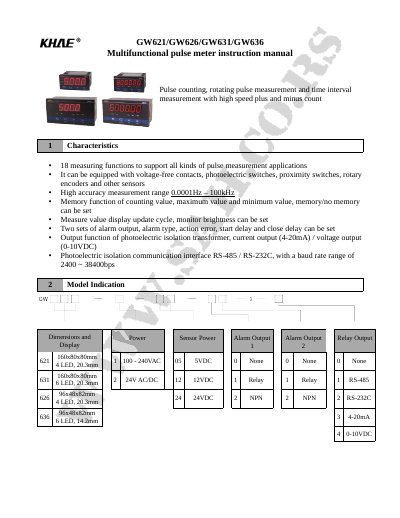
GW GW621/GW626/GW631/GW636 Multifunctional Pulse Meter Instruction Manual
The GW621/GW626/GW631/GW636 Multifunctional Pulse Meter is designed for pulse counting, rotating pulse measurement, and time interval measurement with high-speed plus and minus counting capabilities. It supports 18 measuring functions and can be equipped with various sensors such as voltage-free contacts, photoelectric switches, and proximity switches. The device features a high accuracy measurement range of 0.0001Hz to 100kHz and includes memory functions for counting values, maximum values, and minimum values.
Read onlineGW GW621 GW626 GW631 GW636 specifications
| Sensor Compatibility | 无电压触点、光电开关、接近开关、旋转编码器 |
|---|---|
| Measurement Functions | 高速加减计数、脉冲测量、时间间隔测量 |
| Display | LED display, 4-digit, 20.3mm height |
| Power Supply | 100-240VAC or 24V AC/DC |
Source: GW GW621 GW626 GW631 GW636 Multi-Function Pulse Meter User Manual
All GW GW621 GW626 GW631 GW636 documents by type
Day-to-day operation, settings and troubleshooting. Start here if the product is already set up.
Questions answered in these manuals
Which sensors can be connected to the GW636?
It can connect to no-voltage contacts, photoelectric switches, proximity switches, and rotary encoders.
From: GW GW621 GW626 GW631 GW636 Multi-Function Pulse Meter User Manual
How do I reset the measurement value on the GW636?
Press the RST key to reset the measurement value and stop measurement.
From: GW GW621 GW626 GW631 GW636 Multi-Function Pulse Meter User Manual
How do I enter the engineer menu?
Press the Menu key for 3 seconds to enter the engineer menu.
From: GW GW621/GW626/GW631/GW636 Multifunctional Pulse Meter Instruction Manual
What happens if I forget the menu password?
You must contact the manufacturer or distributor to restore the instrument to its factory value.
From: GW GW621/GW626/GW631/GW636 Multifunctional Pulse Meter Instruction Manual