
Key facts
- Brand
- CONWIN
- Model
- CN1001
- Category
- Other Electronics
- Industry
- Industrial
- Documents
- 3
- Languages
- ZH
- Last added
- 2023-10-20
Start here
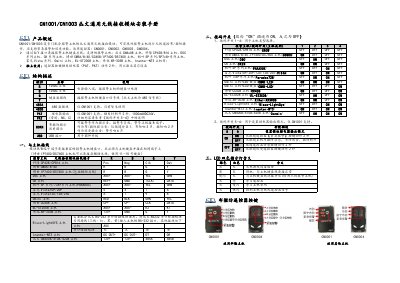
Conwin CN1001/CN1003 Wireless Receiving Module Installation Manual
The Conwin CN1001/CN1003 is a universal wireless receiving module designed to work with various alarm control panels. It enables wireless arming/disarming operations, emergency alarms, and patrol functions. The module connects to the alarm host via a G/Y interface and supports multiple brands including Bosch, DSC, Honeywell, and others. This manual is written in Chinese.
Read onlineConwin CN1001 specifications
| Rated Voltage | 9~14VDC |
|---|---|
| Operating Current | 40mA |
| Operating Temperature | -15℃~60℃ |
| Module Dimensions | 90mm * 90mm * 31mm |
Source: Conwin CN1001/CN1003 Wireless Receiving Module Installation Manual
All Conwin CN1001 documents by type
Day-to-day operation, settings and troubleshooting. Start here if the product is already set up.
Mounting, wiring and first power-up. Read it before the hardware goes in.
Questions answered in these manuals
Which remote controllers are compatible with this module?
The module supports remote controllers CN0001, CN0002, CN0003, and CN0004.
From: Conwin CN1001/CN1003 Wireless Receiving Module Installation Manual
How do I reset the module to factory settings?
Press and hold the K1 button until the red light turns on and then automatically switches to green (about 5 seconds).
From: Conwin CN1001/CN1003 Wireless Receiving Module Installation Manual
What is the rated voltage for the CN1001 module?
The module operates on a rated voltage of 9~14VDC.
From: Conwin CN1001 Wireless Remote Control Module Installation Manual
What are the physical dimensions of the CN1001 module?
The module measures 90mm*90mm*31mm.
From: Conwin CN1001 Wireless Remote Control Module Installation Manual
Which remote controllers are compatible with the CN1001 module?
The module supports CN0001, CN0002, CN0003, and CN0004 remote controllers.
From: Conwin CN1001 Wireless Remote Control Module Installation Guide
How do I reset the module to factory settings?
Press and hold the K1 button until the red light turns on and then automatically switches to green, then release.
From: Conwin CN1001 Wireless Remote Control Module Installation Guide