
This Vocera Badge training guide teaches medicine residents how to use the wearable badge for calls, Push-To-Talk, messaging, and hospital alerts.
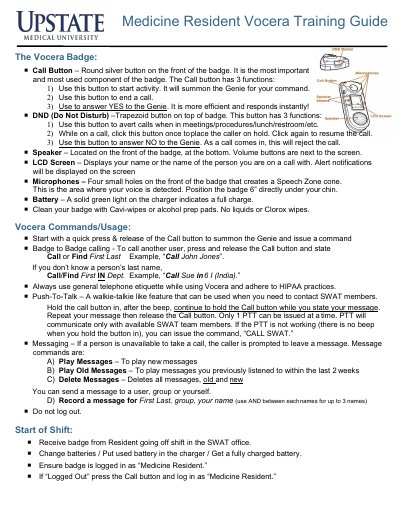
This Vocera Badge training guide instructs medicine residents on using the wearable badge for hands-free communication. It describes the Call button, DND button, speaker, LCD screen, microphones, and battery, and explains how to wear the badge 6” below the chin.
Residents learn to summon the Genie, make badge-to-badge calls, use Push-To-Talk to contact SWAT members, and send or delete messages. The guide also covers code and RRT alerts, speech zone best practices, a phonetic alphabet for nursing units, and answers to common login and DND questions.
| Microphones | Four small holes |
|---|---|
| Battery charge indicator | Solid green light on charger |
| Wear position | 6” directly under chin |
| PTT limit | 1 at a time |
| Message history | 2 weeks |
Press the Call button and state “Medicine Resident” when prompted by the Genie.
Calls go to voice mail, while codes and RRTs break through DND.
Use the Quick Reference Pocket Guide, contact SWAT via Push-To-Talk, or visit the Vocera website.