
Quick installation and connection guide for the VMS VMS-CD-E-VZ 1080p Ultra-WDR Mini Dome IP Camera, covering cabling, login, and ActiveX setup.
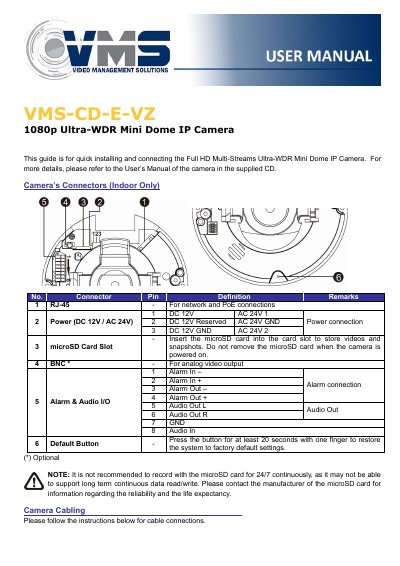
This guide provides quick installation and connection instructions for the VMS VMS-CD-E-VZ 1080p Ultra-WDR Mini Dome IP Camera, suitable for indoor and outdoor use. It describes camera connectors, power and Ethernet cabling, the default button, and initial login steps.
The camera can be powered with a DC 12V / AC 24V adaptor or through PoE using the RJ-45 connector. Users can log in at the default IP address 192.168.0.250 with username Admin and password 1234, then install the ActiveX control to access the browser-based viewer.
| Power input | DC 12V / AC 24V |
|---|---|
| Network interface | RJ-45 for network and PoE |
| Analog video output | BNC |
| Storage | microSD card slot |
| Default IP address | 192.168.0.250 |
| Default username | Admin |
| Default password | 1234 |
The default IP address is 192.168.0.250.
Use the default username Admin and password 1234. The username is case sensitive.
Press the default button for at least 20 seconds with one finger.
Yes, connect an Ethernet cable from the camera's RJ-45 connector to a Power Sourcing Equipment (PSE) switch.