
The Valore V-CA210 Dry Box user manual explains setup, humidity control, specifications, and mildew prevention for protecting electronic devices.
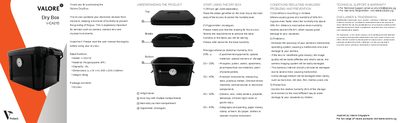
The Valore V-CA210 Dry Box protects electronic equipment such as cameras, lenses, and musical instruments by maintaining low relative humidity. The manual provides clear instructions for installing silica gel, using the analog hygrometer, and achieving ideal storage conditions.
Technical specifications, warranty information, and support contacts are included, along with detailed guidance on preventing mold growth and handling the device safely.
| Model | V-CA210 |
|---|---|
| Material | Polypropylene (PP) |
| Capacity | 10 L |
| Dimensions (L × W × H) | 335 × 235 × 200 mm |
| Weight | 800 g |
The recommended storage humidity is between 20 % and 60 % relative humidity.
Place silica gel (sold separately) inside the tray or main compartment and monitor the level with the analog hygrometer.
Cameras, camera lenses, musical instruments, and other moisture‑sensitive electronic devices can be stored safely.
Control the relative humidity to stay below 55 % RH, as mold grows rapidly above that level.