
This guide details the installation and configuration of the USG Single Sign-On (SSO) Agent on Domain Controllers and Domain Workstations.
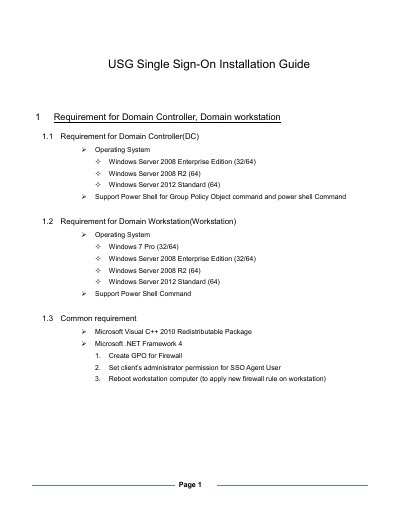
This document provides instructions for installing the USG Single Sign-On (SSO) Agent on Windows-based Domain Controllers and Domain Workstations. It outlines specific system requirements, including supported operating systems such as Windows Server 2008/2012 and Windows 7 Pro, as well as prerequisites like Microsoft Visual C++ 2010 and .NET Framework 4.
The guide covers two distinct installation scenarios: deploying the agent on a Domain Controller and deploying it on a Domain Workstation. It includes step-by-step procedures for preparing the environment, creating necessary domain accounts, running the installer, and configuring the Security Event Logs Collector tool to forward logs to the USG gateway.
| Supported Domain Controller OS | Windows Server 2008 Enterprise Edition (32/64), Windows Server 2008 R2 (64), Windows Server 2012 Standard (64) |
|---|---|
| Supported Workstation OS | Windows 7 Pro (32/64), Windows Server 2008 Enterprise Edition (32/64), Windows Server 2008 R2 (64), Windows Server 2012 Standard (64) |
| Required Framework | Microsoft .NET Framework 4 |
| Max Forward Computers | 4 |
You can add a maximum of 4 domain controllers to the table list.
No, it is recommended to use another domain account instead of the domain administrator to run the SSO Agent service.