
Installation instructions for the Tridonic basicDIM DGC digital control module with switch input for controlling up to 20 DALI or DSI ballasts.
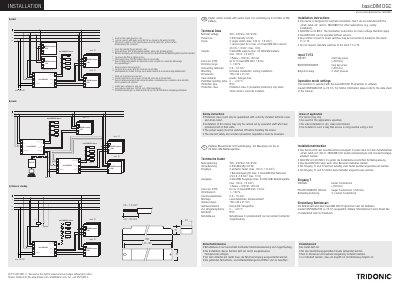
The Tridonic basicDIM DGC is a digital control module designed for luminaire installation. It features a switch input to control up to 20 DALI or DSI ballasts and includes technical specifications for voltage, power loss, and input/output capabilities. The device supports two single switch inputs and one sensor input for up to four basicDIM DGC sensors.
| Nominal voltage | 220 – 240 V AC, 50 / 60 Hz |
|---|---|
| Power loss | 2.5 W (standby 0.5 W) |
| Inputs | 2 single switch (max. 100 m, 1.5 mm²), 1 sensor input for a max. of 4 basicDIM DGC sensors |
| Outputs | 2 DALI/DSI outputs (max. 20 DALI/DSI ballasts, max. 100 m, 1.5 mm²) |
| Relay capacity | 1 Relais = 500 W / 200 VA |
| Link Line (CH2) | up to 10 basicDIM DGC, 13 VDC |
| Dimensions | 159 x 30 x 21 mm |
| Permitted operating temp. | 0 ... +60 °C |
| Protection type | IP20 |
Yes, the basicDIM DGC can be operated without sensors.
Any number of push to make switches may be connected in parallel to the inputs T1 or T2.
The dimming range is 1 – 100 %.