
Installation guide for the TP-Link TL-SG1005P 5-port Gigabit desktop switch with 4 PoE ports, LED explanations, specifications and FAQs.
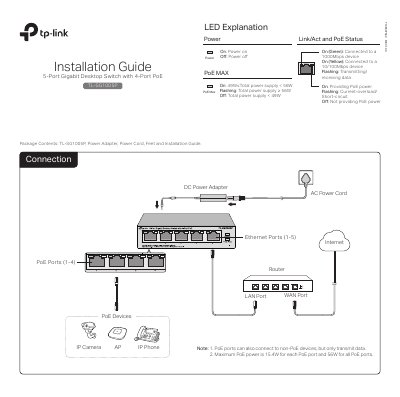
The TP-Link TL-SG1005P is a 5-port Gigabit desktop switch with four PoE ports. The installation guide lists the package contents, shows connection examples for PoE devices such as IP cameras, APs, and IP phones, and explains the Power, PoE MAX, and Link/Act/PoE status LEDs. It also provides FAQs and specifications, including a maximum PoE power of 15.4W per port and 56W total for all PoE ports.
The guide notes that PoE ports can also connect to non-PoE devices but only transmit data. The FAQ explains troubleshooting for the Power LED and Link/Act LED, and notes that when total PoE consumption exceeds 56W, the system cuts off power to port 4.
| Standard protocol | IEEE802.3i, 802.3u, 802.3ab, 802.3x, 802.3af, 802.1p |
|---|---|
| Interface | 5 10/100/1000Mbps RJ45 ports, auto-negotiation MDI/MDIX |
| PoE ports | Ports 1-4 |
| Total PoE power supply | 56W |
| Maximum PoE power per port | 15.4W |
| Switching capacity | 10Gbps |
| MAC address table | 2K |
| Transfer method | Store-and-Forward |
| Power supply | External power adapter; input 100-240VAC, 50/60Hz; output 48VDC/1.25A |
| Operating temperature | 0˚C to 40˚C (32˚F to 104˚F) |
| Storage temperature | -40˚C to 70˚C (-40˚F to 158˚F) |
| Operating humidity | 10% to 90%RH non-condensing |
| Storage humidity | 5% to 95%RH non-condensing |
Check that the AC power cord is properly connected to the switch and power source, that the supply voltage meets the switch input voltage requirements, and that the power source is ON.
Make sure the cable connectors are firmly plugged into the switch and the connected device, the device is turned on and working normally, and the cable is less than 100 meters (328 feet) long.
If the total power consumption of connected PoE devices exceeds 56W, the system cuts off power to port 4.