
Saeco Intelia Evo OTC coffee machine user manual: first-time setup, brew group handling, descaling, water filter, cleaning and troubleshooting.
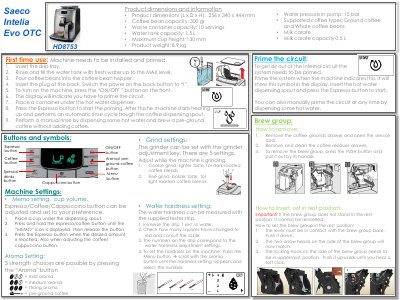
This user manual covers the Saeco Intelia Evo OTC automatic coffee machine (reference HD8753). It explains the buttons and symbols on the machine, how to store a preferred cup volume with the Memo setting, how to choose one of three aroma strengths, and how to set grind and water hardness. It also lists the machine's dimensions, capacities and pump pressure.
The manual then walks through first-time use and priming the circuit, removing and reinserting the brew group in its rest position, and daily, weekly and monthly cleaning of the drip tray, coffee grounds container, milk carafe and brew group. A step-by-step descaling procedure with the Saeco descaler, instructions for activating and resetting a water filter, and a troubleshooting section with error codes E01, E03, E04, E05 and E14 close the document.
| Product dimensions (L x D x H) | 256 x 340 x 444 mm |
|---|---|
| Coffee bean capacity | 300 g |
| Waste container capacity | 10 servings |
| Water tank capacity | 1.5 L |
| Maximum cup height | 130 mm |
| Product weight | 8.9 kg |
| Grind settings | 5 settings |
| Water pressure in pump | 15 bar |
| Milk carafe capacity | 0.5 L |
| Supported coffee types | Ground coffee and whole coffee beans |
Place a cup under the dispensing spout, press and hold the espresso/coffee button until the MEMO icon appears, then release it and press the Espresso button when the desired amount is reached.
Only the Philips/Saeco decalcifier CA6700 should be used, and the process takes approximately 35 minutes.
Take out the brew group, unblock and clean the coffee duct outlet (coffee funnel), then clean and re-grease the brew group before placing it back.
Clean the brew group weekly with fresh, lukewarm water, clean it monthly with the coffee oil remover tablet CA6704, and lubricate it once a month with Saeco grease HD5061.