
Connection guide for Russound A-H2 2-zone audio hub, including wiring, IR, power, and expansion connections.
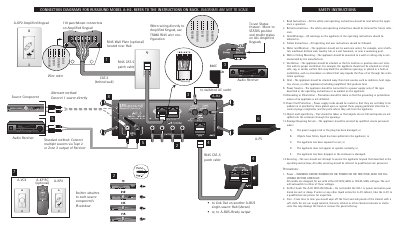
This document provides detailed connection diagrams and instructions for installing the Russound A-H2 2-zone audio distribution hub. It covers wiring to amplified keypads, IR emitters, power supplies, and expansion inputs using CAT-5 cables. The A-H2 connects to source components via receiver outputs and can be linked to other A-BUS hubs to expand the system. Safety precautions and installation guidelines are included to ensure proper setup and operation.
The A-H2 is designed for use with Russound’s A-BUS system and supports infrared control of components. It includes status power input, LED indicators, and a compact design for mounting near audio equipment. The document also explains how to enable the status feature for visual confirmation of source component power status.
| Power Supply | A-PS. 24VDC/2.5A |
|---|---|
| Status Power | 12VDC/100mA |
| Keypad Connection | RJ-45 T568A Standard |
| Expansion Connection | RJ-45 T568A Standard |
| Emitter Connections | 1/8" Male. Tip (+), sleeve (–) |
| Dimensions | 6.5"W x 2"H x 1.25"D (165x51x32mm) |
| Weight | 9.5 oz. (270g) |
Connect multiple sources via the Tape 2 or Zone 2 output of a receiver. Alternatively, connect one source directly to the A-H2.
The status feature visually confirms when the source component is on and turns off all Amplified Modules when the source is off. To enable it, move the status jumper on all Amplified Modules to the "Enabled" position, move the status switch on the Hub to the "STATUS" position, and connect a Russound Model 846C adapter to the STATUS input.
Yes, connect the Link Out or A-BUS Ready Sub-Zone output of one device to the Link In (Expansion Input) of the next device. Never connect Link Out to another Link Out or A-BUS Ready output.
The Russound A-H2 is fully guaranteed for two (2) years from the date of purchase against defects in materials and workmanship. Service must be performed by Russound and the unit must be returned at the owner’s expense with prior written permission.