
User manual for the Rescue Technology Tracker DTS, a digital avalanche beacon with dual antenna system for search and rescue operations.
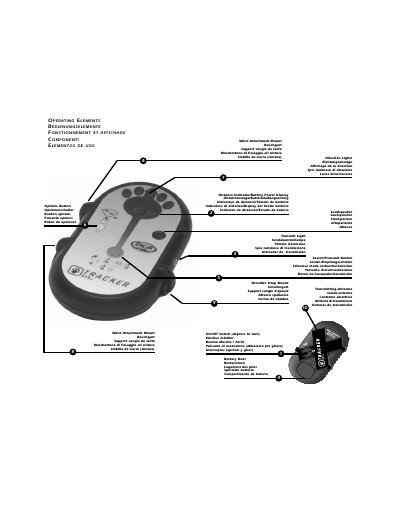
The Rescue Technology Tracker DTS is a digital avalanche beacon designed for search and rescue operations in backcountry environments. It features a dual antenna system for improved signal detection and includes modes such as search, transmit, and special (SP) mode for multiple victim scenarios. The device operates on three AAA alkaline batteries and includes features like auto-revert and mute mode for user convenience. It is intended for trained users and requires regular practice to ensure effective use in emergency situations.
The manual covers basic operation, including turning the device on/off, changing batteries, entering search mode, and using the device in various search scenarios such as primary, secondary, and pinpoint searches. It also includes safety instructions, such as always traveling with a partner and carrying rescue equipment, and provides guidance on maintaining the device, including battery replacement and handling moisture.
| Battery Type | Three AAA alkaline batteries |
|---|---|
| Battery Life | Approximate, depends on manufacturer and temperature |
| Operating Mode | Transmit and Search modes |
Push and turn the on/off switch on the back of the Tracker to the "on" position. It performs a self-diagnostic check, displays battery power in percent, and enters transmit mode.
The auto-revert system reverts the Tracker to transmit mode after five minutes in search mode if engaged. It helps prevent prolonged search mode usage.
Press the options button while in search mode. When "SP" appears in the display window, you are in special mode.
Open the battery door to help allow the unit to dry. Remove batteries during extended periods of inactivity.