
Plink Y-C9 carrier board product manual: board specs, interfaces, pin definitions, recovery mode, setup and serial port test for Jetson AGX Orin/Xavier modules.
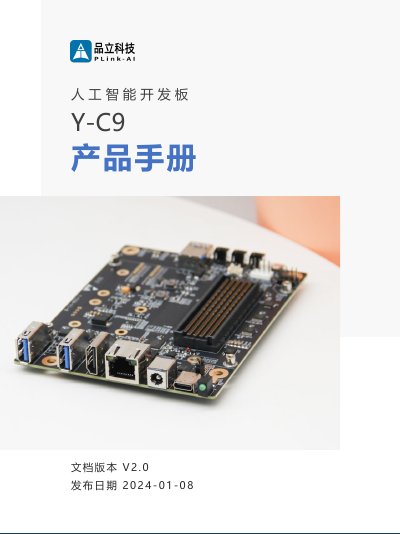
The Plink Y-C9 is a small carrier board for NVIDIA Jetson AGX Orin and AGX Xavier series modules, aimed at compact deployments. According to the manual, its main interfaces have ESD protection, the power design includes over-voltage and reverse-polarity protection, and all board components are wide-temperature parts. Two miniPCIe connectors (with USB 2.0 and PCIe x1 signals) allow many function modules to be added.
The manual covers product introduction, specifications, external interfaces and their functions, interface pin definitions, ordering information, Recovery mode, usage, special notes and a serial port test. The board is listed at 136mm x 100mm x 20mm and 112g, with a +12V DC input, USB 3.0 Type-A, USB Type-C (OTG), Micro USB debug, HDMI, RJ45, M.2 Key M (2280), two miniPCIe slots, RTC battery connector, fan header and two 3.3V TTL serial ports. It also states that when used with an AGX Orin module only one USB Type-A runs at USB 3.0, one miniPCIe slot and the RTC function are unavailable. This manual is written in Chinese.
| Supported modules | NVIDIA Jetson AGX Xavier / AGX ORIN Series Modules |
|---|---|
| Input type | DC |
| Input voltage | +12V |
| Operating temperature | -40 ~ +85℃ |
| Dimensions (L x W x H) | 136mm * 100mm * 20mm (including I/O ports and mounting holes) |
| Weight | 112g |
| Power jack (J18) maximum input | 12V 10A |
| USB3.0 Type-A ports | 3 |
| miniPCIe slots | 2 |
| Serial ports | 2 x 3.3V TTL serial port |
It supports the NVIDIA Jetson AGX Xavier and AGX Orin series modules.
It takes a +12V DC input through the J18 power jack, which supports up to 12V 10A.
Power off, connect the USB Type-C port (J2) to a Jetson host with a Micro-USB cable, hold the Recovery button (SW3) while powering on for 3 to 4 seconds, then release it. If the system does not auto power on, hold SW3 and press the Power button (SW1) instead.
The manual uses cutecom, installed with sudo apt-get install cutecom, with RX and TX connected for a single-port loopback test.