
This manual provides installation, usage, and safety instructions for the Pixel Vertax D12 battery grip compatible with Nikon D800 cameras.
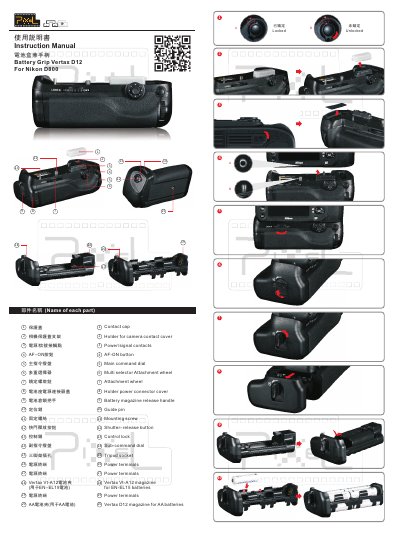
The Pixel Vertax D12 is a battery grip designed for use with the Nikon D800 camera. It features an alternate shutter-release button, AF-ON button, multi-selector, and main/sub-command dials to facilitate vertical shooting. The device can be powered by one EN-EL15 rechargeable Li-ion battery or eight AA/LR6 alkaline batteries. This manual is written in Chinese.
| Compatible Camera | Nikon D800 |
|---|---|
| Battery Options | One EN-EL15 or 8 AA/LR6 |
| Working Temperature | 0°C to +40°C |
| Dimensions | Approx. 150.8x54.8x77.4 mm |
It can be used with one EN-EL15 rechargeable Li-ion battery or eight AA/LR6 alkaline batteries.
Align the mounting screw with the tripod socket and tighten the attachment wheel in the direction of the arrow.
The blinking icon indicates that the battery-chamber cover is not locked; close and latch it.