
Spanish quick start guide for the Philips DVP 5960 DVD player covering package contents, SCART connection, setup, language settings, playback and…
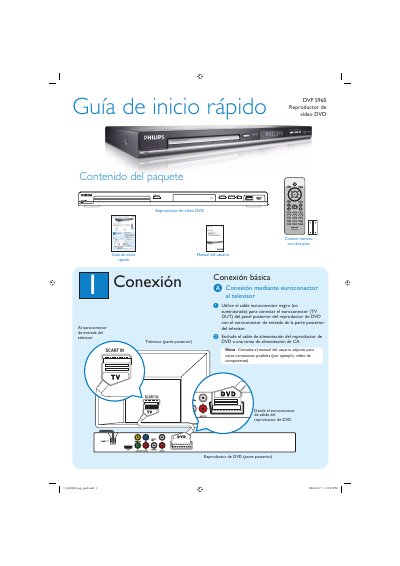
This is the Spanish-language quick start guide (Guía de inicio rápido) for the Philips DVP 5960 DVD video player. It lists the package contents, which include the DVD player, a remote control with two batteries, the user manual and this quick start guide.
The guide walks new users through connecting the player to a TV using a SCART (euroconector) cable, finding the correct display channel, setting the on-screen, audio, subtitle and menu languages, starting and stopping playback, and basic troubleshooting for power, picture, sound and remote control issues. It directs readers to the user manual and www.philips.com/support for further help. This manual is written in Spanish.
El paquete incluye el reproductor de vídeo DVD, el control remoto con dos pilas, el manual del usuario y la guía de inicio rápido.
Use el cable euroconector (SCART) para conectar la salida TV OUT del reproductor a la entrada SCART del televisor y enchufe el cable de alimentación a una toma de CA.
Pulse SETUP, vaya a la General Setup Page, seleccione OSD Language, elija un idioma con S T y pulse OK.
Compruebe o sustituya las pilas, reduzca la distancia al reproductor y dirija el control remoto directamente al sensor de infrarrojos.