
This guide provides instructions for downloading, installing, and using the Pearson EasyPenConnector tool to import audio files to the EasyPen device.
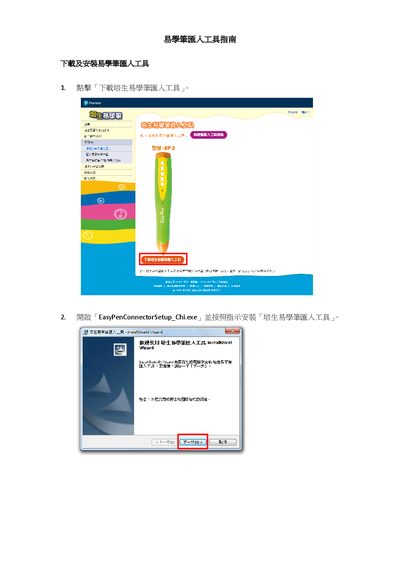
This document serves as a user guide for the Pearson EasyPenConnector tool, specifically the Simplified Chinese version (EP2). It details the system requirements, including the need for Windows 6.0 and a screen resolution of 1024x768 or higher. The guide explains how to download the tool from the Pearson website and provides step-by-step instructions for the installation process using the InstallShield Wizard. This manual is written in Chinese.
| Software Version | EP2 |
|---|---|
| Operating System | Windows 6.0 |
| Minimum Screen Resolution | 1024x768 |
| Compatible Device Marking | Easy pen'字样为红色 |
The tool requires Windows 6.0 and a screen resolution of 1024x768 or higher.
You must start the tool from the Start menu.
The audio files are successfully imported to the EasyPen.