
Step-by-step guide for pairing Oticon Bluetooth adapters with FittingLINK WP-2 and FittingLINK 3.0 and detecting hearing aids in Genie and Genie 2.
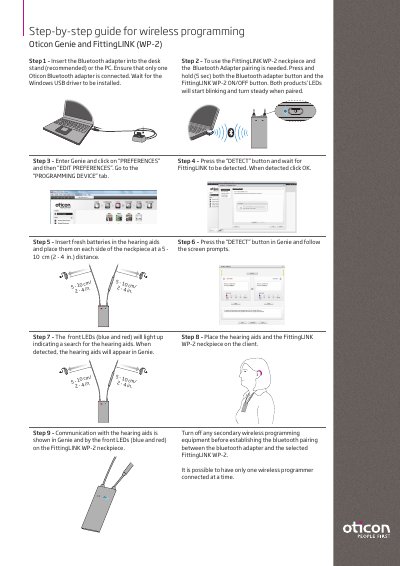
This two-page step-by-step guide describes wireless programming of Oticon hearing aids with Genie and FittingLINK WP-2, and with Genie 2 and FittingLINK 3.0. It covers inserting the Bluetooth adapter into the desk stand or PC, pairing the adapter with the FittingLINK WP-2 neckpiece, selecting the programming device in the Genie preferences, and detecting the hearing aids.
The second part explains how FittingLINK 3.0 is automatically added as a programming option under the DETECT button in Genie 2, the batteries and pairing range needed for detection, and the LED indications on the neckpiece. It also notes that only one wireless programmer should be connected at a time and recommends running only one fitting software application at a time.
| Button hold time for Bluetooth adapter / FittingLINK WP-2 pairing | 5 seconds |
|---|---|
| Hearing aid placement distance from FittingLINK WP-2 neckpiece | 5 - 10 cm (2 - 4 in.) |
| FittingLINK 3.0 pairing range | within 30 cm |
| Wait time after inserting fresh batteries (FittingLINK 3.0 procedure) | approx. 15 sec |
| Number of wireless programmers connected at a time | one |
Press and hold both the Bluetooth adapter button and the FittingLINK WP-2 ON/OFF button for 5 seconds; both LEDs start blinking and turn steady when paired.
Place them on each side of the neckpiece at a 5 - 10 cm (2 - 4 in.) distance.
Place the hearing aids and FittingLINK 3.0 within a 30 cm pairing range.
Only one wireless programmer can be connected at a time.