
NEC DT800 Series Telephone User Guide

User guide for the NEC DT800 Series telephone covering layout, button functions, dialing procedures, voicemail access, and speed dial programming.
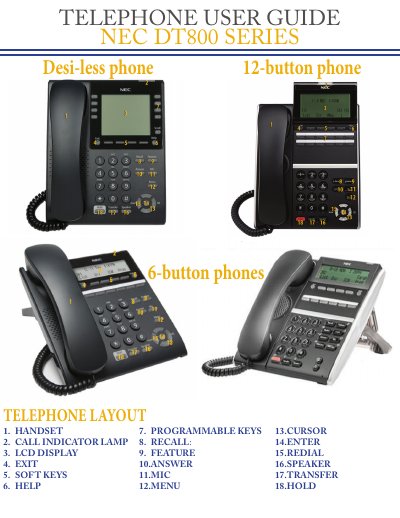

NEC DT800 Series Telephone User Guide - cover page
Brand
NEC
Category
Telephone
Document type
User Manual
Language
English
Pages
3
File format
PDF
File size
661 KB
Published
22 October, 2026
Updated
22 October, 2026
MD5 checksum
EC835D733333F099266E5971E9D204C3

About this manual

This document serves as a user guide for the NEC DT800 Series telephone. It details the physical layout of the device, including the handset, LCD display, soft keys, and programmable keys. The guide explains the function of each button, such as the Call Indicator Lamp, Menu, and Transfer keys, and provides instructions for using features like hands-free conversation and directory search.

What's inside

  • Telephone Layout
  • Button Description
  • Dialing Procedures
  • Voicemail Access
  • Paging
  • Station Speed Dial
  • Directory Search

Frequently asked questions

How many previously dialed numbers can the REDIAL key save?

The phone saves up to five previously dialed numbers.

What number should be dialed to access voicemail from an office phone?

You should dial 8000 or press the Enter key then press 2.

What is the external paging access code?

The external paging access code is 484.266.4444.

Download PDF (661 KB)

More NEC Manuals


View all NEC manuals →