
The NA NA6942PT Temperature Controller User Manual describes temperature control, fan control, defrost control, alarms, real-time clock, and central…
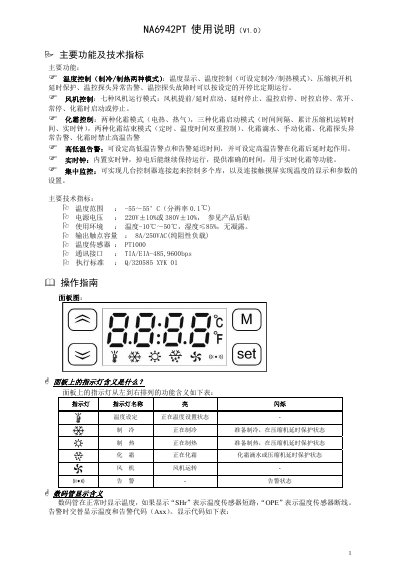
The NA NA6942PT is a temperature controller for cooling and heating modes, with compressor start delay protection, temperature sensor fault alarms, and periodic operation when the sensor fails. It provides seven fan operating modes and defrost control in electric or hot gas modes with time-interval, cumulative runtime, or real-time clock start methods.
It also supports high and low temperature alarms, a built-in real-time clock that keeps running after power loss, and central monitoring of multiple controllers. Technical data includes a -55 to 55°C measurement range with 0.1°C resolution, PT1000 sensor, TIA/EIA-485 interface at 9600bps, and 8A/250VAC output contacts. This manual is written in Chinese.
| Temperature range | -55~55°C |
|---|---|
| Power voltage | 220V±10% or 380V±10% |
| Operating environment | -10°C to 50°C, humidity ≤85% |
| Output contact capacity | 8A/250VAC (resistive load) |
| Temperature sensor | PT1000 |
| Communication interface | TIA/EIA-485, 9600bps |
| Executive standard | Q/320585 XYK 01 |
Long press the Set key for 2 seconds to enter temperature setting state, then use the up or down key to change the value and press Set again to exit.
Press and hold the down key for 5 seconds to enter defrost state; press and hold it again for 5 seconds to force defrost to end.
SHr means the temperature sensor is short-circuited, and OPE means the temperature sensor is disconnected.