
The Minirig Portable Audio Enhancer Quick Start Guide explains how to power the Minirig on and off, charge it by USB, choose low or high gain, link multiple…
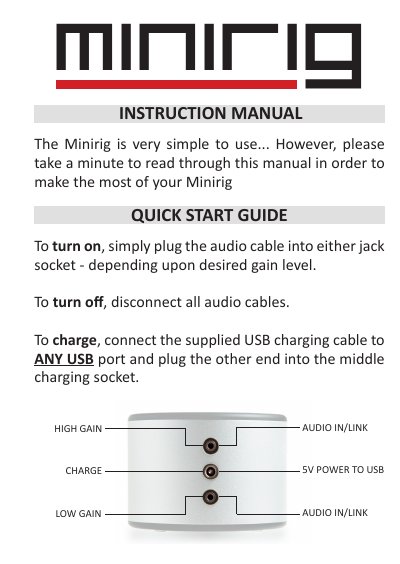
The Minirig is a simple portable audio enhancer. Plug an audio cable into either jack socket to turn it on, choosing the socket for low or high gain. Disconnect all audio cables to turn it off. Charge using the supplied USB cable connected to any USB port and the middle charging socket.
Twin inputs allow low or high gain selection and linking of multiple Minirigs for louder sound. The top LED shows battery level as green, cyan, blue, purple, or red and flashes while charging. A built-in limiter prevents clipping distortion, and placing the Minirig near a wall or floor improves bass response.
| Warranty | 1 year |
|---|---|
| Battery level indicator | GREEN 100-75%, CYAN 75-50%, BLUE 50-25%, PURPLE <25%, RED 0% |
| Gain selection | LOW or HIGH via twin inputs |
| Charging method | Supplied USB cable to any USB port |
| Circuit protection | Built-in limiter |
Plug an audio cable into either jack socket to turn on; disconnect all audio cables to turn off.
Connect the supplied USB charging cable to any USB port and plug the other end into the middle charging socket.
They indicate battery level, from green at 100-75% down to red at 0%.
The Minirig is covered by a 1 year warranty.