
Key facts
- Manuals
- 1
- Languages
- EN
- Last added
- 2026-11-17
Featured Minirig manuals
Minirig Portable Audio Enhancer Quick Start Guide
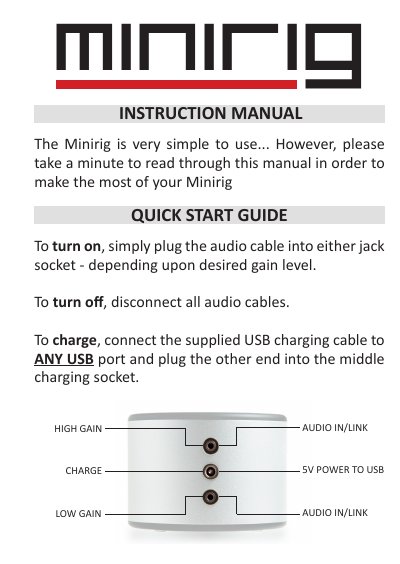
The Minirig is a simple portable audio enhancer. Plug an audio cable into either jack socket to turn it on, choosing the socket for low or high gain. Disconnect all audio cables to turn it off. Charge using the supplied USB cable connected to any USB port and the middle charging socket.
Twin inputs allow low or high gain selection and linking of multiple Minirigs for louder sound. The top LED shows battery level as green, cyan, blue, purple, or red and flashes while charging. A built-in limiter prevents clipping distortion, and placing the Minirig near a wall or floor improves bass response.
Covers: GAIN OPTIONS · LED BATTERY INDICATER · LED FLASHING · CHARGING · SPEAKER LIMITER · PLACEMENT
Latest Minirig manuals
Minirig Portable Audio Enhancer Quick Start Guide
Quick Start Guide 4 pages · 245 KB · ENThe Minirig Portable Audio Enhancer Quick Start Guide explains how to power the Minirig on and off, charge it by USB, choose low or high gain, link multiple…
Which document do I need?
Quick Start Guide
The shortest path to a working setup, usually only a few pages.
Questions answered in Minirig manuals
How do I turn the Minirig on and off?
Plug an audio cable into either jack socket to turn on; disconnect all audio cables to turn off.
How do I charge the Minirig?
Connect the supplied USB charging cable to any USB port and plug the other end into the middle charging socket.