
User manual for Microtechnica's OSD-MOD232(J) on-screen character generator board, controlling video overlays via UART serial communication.
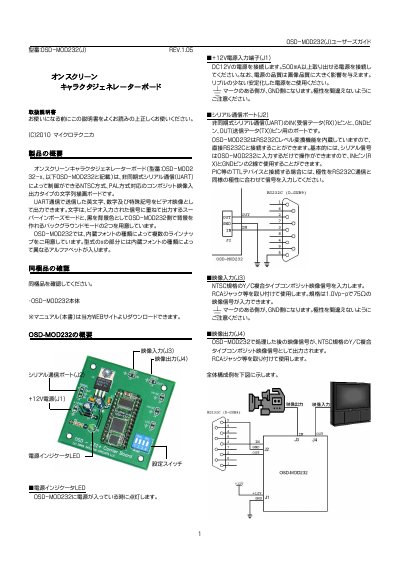
This user manual describes the Microtechnica OSD-MOD232(J) on-screen character generator board, which overlays text on video signals via UART serial communication. It supports NTSC and PAL formats and offers two display modes: superimpose over input video or display on a black background generated by the board. The manual covers hardware setup, switch configuration, video and serial connections, power requirements, and command protocols for controlling text display.
The board includes built-in fonts with different line-up options based on the font type. It requires a stable 12V DC power supply and can be connected to computers or microcontrollers via RS232C or TTL-level serial interfaces. The manual also details commands for setting background modes, clearing the screen, and toggling overlay visibility. This manual is written in Japanese.
| Communication Interface | UART (Non-synchronous serial) |
|---|---|
| Video Standards | NTSC and PAL |
| Display Modes | Superimpose and Background |
| Power Supply | 12V DC, 500mA minimum |
| Serial Baud Rate | 9600bps or 19200bps |
Connect using a D-SUB9 female connector with a straight cable. For TTL devices like PIC microcontrollers, use a MAX232 or similar level shifter to match voltage and polarity.
Superimpose mode overlays text on the input video signal, while Background mode displays text on a black background generated by the board.
The default communication speed is 9600bps, set via dip switch SW1.
Use the E3h command to clear the screen and reset the font position to 00h.