
Key facts
- Manuals
- 1
- Languages
- JA
- Last added
- 2026-11-06
Featured Microtechnica manuals
Microtechnica OSD-MOD232(J) On-Screen Character Generator Board User Manual
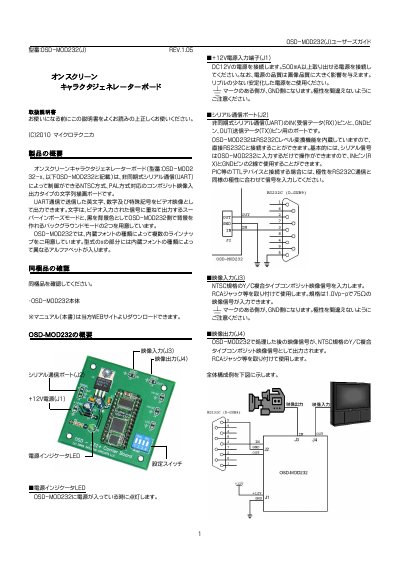
This user manual describes the Microtechnica OSD-MOD232(J) on-screen character generator board, which overlays text on video signals via UART serial communication. It supports NTSC and PAL formats and offers two display modes: superimpose over input video or display on a black background generated by the board. The manual covers hardware setup, switch configuration, video and serial connections, power requirements, and command protocols for controlling text display.
The board includes built-in fonts with different line-up options based on the font type. It requires a stable 12V DC power supply and can be connected to computers or microcontrollers via RS232C or TTL-level serial interfaces. The manual also details commands for setting background modes, clearing the screen, and toggling overlay visibility. This manual is written in Japanese.
Covers: Hardware Preparation · Switch Settings · Video Signal Connection · Serial Communication Setup · Power Connection · Serial Commands
Latest Microtechnica manuals
Microtechnica OSD-MOD232(J) On-Screen Character Generator Board User Manual
User Manual 11 pages · 468 KB · JAUser manual for Microtechnica's OSD-MOD232(J) on-screen character generator board, controlling video overlays via UART serial communication.
Which document do I need?
User Manual
Day-to-day operation, settings and troubleshooting. Start here if the product is already set up.
Questions answered in Microtechnica manuals
How do I connect the OSD-MOD232 to a computer?
Connect using a D-SUB9 female connector with a straight cable. For TTL devices like PIC microcontrollers, use a MAX232 or similar level shifter to match voltage and polarity.
From: Microtechnica OSD-MOD232(J) On-Screen Character Generator Board User Manual
What are the two display modes available?
Superimpose mode overlays text on the input video signal, while Background mode displays text on a black background generated by the board.
From: Microtechnica OSD-MOD232(J) On-Screen Character Generator Board User Manual