
This quick installation guide covers setup via web browser or WPS button, LED status meanings, and troubleshooting for the MERCUSYS Range Extender.
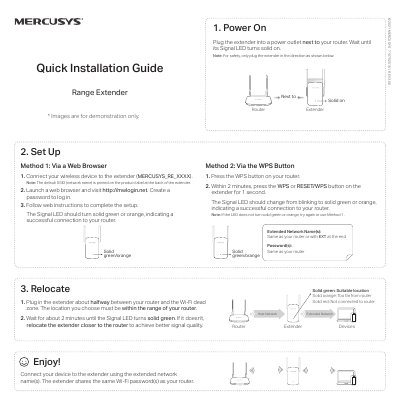
This document provides a quick installation guide for the MERCUSYS Range Extender model 7107500161 REV3.0.0. It explains how to power on the device, connect it to your router using either a web browser or the WPS button, and verify successful connection via LED indicators.
The guide also includes troubleshooting steps for common issues such as inability to access the management page, forgotten passwords, or signal problems. Additionally, it lists safety information and care instructions for proper operation.
With the extender powered on, press and hold the Reset or RESET/WPS button until the Signal LED turns off, then release. When it turns solid on again, the process is complete.
Ensure your device is connected to the extended network using the correct SSID and verify that http://mwlogin.net is entered correctly in the browser.
A solid red Signal LED indicates that the extender is not connected to the router.