
Key facts
- Manuals
- 2
- Languages
- EN
- Last added
- 2026-10-30
Featured Mercusys manuals
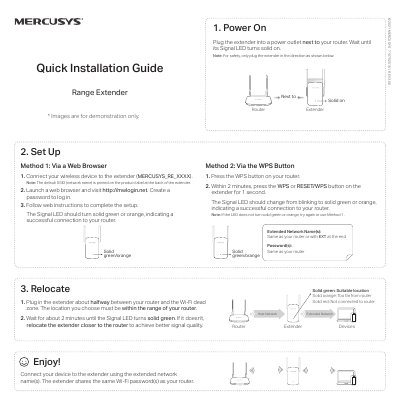
MERCUSYS Range Extender 7107500161 Quick Installation Guide
This document provides a quick installation guide for the MERCUSYS Range Extender model 7107500161 REV3.0.0. It explains how to power on the device, connect it to your router using either a web browser or the WPS button, and verify successful connection via LED indicators.
The guide also includes troubleshooting steps for common issues such as inability to access the management page, forgotten passwords, or signal problems. Additionally, it lists safety information and care instructions for proper operation.
Covers: Power On · Relocate · Set Up via Web Browser · Set Up via WPS Button · LED Status Indication · Reset the Extender
Mercusys AC1200 Whole Home Mesh Wi-Fi System User Guide
This guide introduces the Mercusys Halo Whole Home Mesh Wi-Fi System AC1200 and its companion app. It covers setup using the app, Wi-Fi configuration, guest networks, device blacklisting, firmware updates, parental controls, QoS settings, monthly reports, and managing multiple units. The guide also includes safety and regulatory information for global use.
The system includes Halo units with status LEDs, Ethernet ports, and a reset button. Setup involves downloading the Mercusys app, logging in or signing up, and following step-by-step instructions to configure the network. The app dashboard allows monitoring device status, managing connected devices, and adding more Halo units.
Covers: About This Guide · Appearance · Set Up Your Halo · Dashboard · Wi-Fi Settings · Blacklist
Latest Mercusys manuals
MERCUSYS Range Extender 7107500161 Quick Installation Guide
Quick Start Guide 2 pages · 316 KB · ENThis quick installation guide covers setup via web browser or WPS button, LED status meanings, and troubleshooting for the MERCUSYS Range Extender.
Mercusys AC1200 Whole Home Mesh Wi-Fi System User Guide
User Manual 26 pages · 5 MB · ENUser guide for Mercusys AC1200 Whole Home Mesh Wi-Fi System covering setup, Wi-Fi settings, blacklist, updates, parental controls, QoS, and app management.
Which document do I need?
Quick Start Guide
The shortest path to a working setup, usually only a few pages.
User Manual
Day-to-day operation, settings and troubleshooting. Start here if the product is already set up.
Questions answered in Mercusys manuals
How do I reset the extender?
With the extender powered on, press and hold the Reset or RESET/WPS button until the Signal LED turns off, then release. When it turns solid on again, the process is complete.
From: MERCUSYS Range Extender 7107500161 Quick Installation Guide
What should I do if I cannot access the web management page?
Ensure your device is connected to the extended network using the correct SSID and verify that http://mwlogin.net is entered correctly in the browser.
From: MERCUSYS Range Extender 7107500161 Quick Installation Guide
Can I add more Halo units to my network?
Yes, tap the + button on the top right corner of the app dashboard to add more Halo units.
From: Mercusys AC1200 Whole Home Mesh Wi-Fi System User Guide
What is the product name and its stated use?
The product is the AC1200 Whole Home Mesh Wi-Fi System, used to provide whole home mesh Wi-Fi coverage.
From: Mercusys AC1200 Whole Home Mesh Wi-Fi System User Guide