
Maverick TM-03 clip-on electronic timer product manual: battery installation, clock setting, 12/24-hour display, stopwatch and three countdown timers.
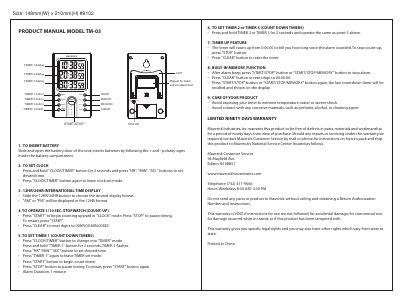
This is the product manual for the Maverick TM-03 Clip electronic timer, a magnet-backed unit for metal surface attachment measuring 148 mm wide by 210 mm high. It walks through inserting the battery, setting the clock with the HR, MIN and SEC buttons, and switching between 12-hour and 24-hour display formats.
The manual then explains the 1/10 second stopwatch count-up operation, setting and running Timer 1, Timer 2 and Timer 3 as countdown timers with a one-minute alarm, the timer-up feature that counts how long since the alarm sounded, and the built-in memory function that recalls the last countdown. A care section and a limited ninety-day warranty from Maverick Industries, Inc. close the document.
| Model | TM-03 |
|---|---|
| Alarm duration | 1 minute |
| Stopwatch resolution | 1/10 second |
| Display formats | 12HR / 24HR selectable |
| Timer displays | Timer 1, Timer 2, Timer 3 |
| Attachment | Magnet for metal surface attachment |
| Size | 148 mm (W) x 210 mm (H) |
| Warranty | Ninety days |
Press and hold the CLOCK/TIMER button for 2 seconds, then press the HR, MIN and SEC buttons to set the desired time. Press CLOCK/TIMER again to leave clock set mode.
The alarm sounds for 1 minute.
Slide the 12HR/24HR button to the desired display format. AM or PM is shown in the 12HR format.
Yes. After the alarm, the timer counts up from 0:00:00 to show how long since the alarm sounded; press STOP to end count-up and CLEAR to reset.