
User manual for the Maglocks HMS-MF Mifare hotel lock software version 5.1.7: installation, activation, lock setting and card issuing.
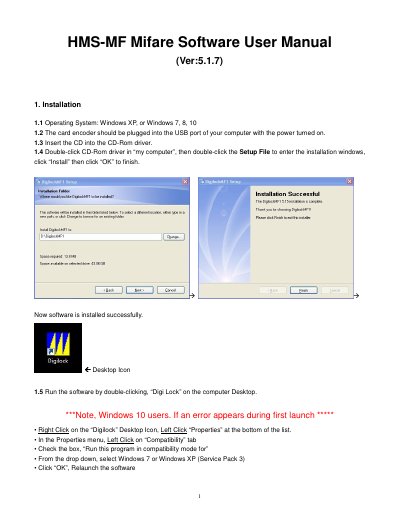
This is the user manual for the HMS-MF Mifare hotel lock software, version 5.1.7. It explains how to install the program from the CD on Windows XP, Windows 7, 8 or 10 with the card encoder plugged into a USB port, and how to launch it from the Digi Lock desktop icon, including a compatibility-mode workaround for Windows 10. It then covers software activation with a Special Card, hotel name, level passwords and operator details.
The rest of the manual describes the daily work of the system: issuing Room Number Set Cards and Time Cards, programming locks with the Reset Card, Room Number Set Card and Time Card, and issuing guest cards, GM and Guard cards, building and floor cards, record cards, limit cards and villa cards. Check-out, record and inquiry operations, the function of the main buttons, and a table of common error messages with their causes and solutions are also included.
| Software version | 5.1.7 |
|---|---|
| Supported operating systems | Windows XP, Windows 7, 8, 10 |
| Maximum buildings | 6 |
| Maximum floors per building | 99 |
| Maximum rooms per floor | 99 |
| Maximum level password length | 8 digits |
| Maximum hotel name length | 20 characters |
It runs on Windows XP, Windows 7, Windows 8 and Windows 10.
The initial code is 0 (zero) and the password field is left blank.
Up to 6 buildings, up to 99 floors per building and up to 99 rooms per floor.
Three cards are used: the Mifare Reset Card, the Room Number Set Card and the Time Card, swiped on the lock one by one.
It means the card is not a valid card; use a new valid card.
A GM Card opens all locks except when they are locked from inside, while a Guard Card opens all locks even when they are locked inside.