
Sign-up guide for new Lexus L-Connect ME users: download the app, scan the QR code or enter your 12-character license code, and finish registration.
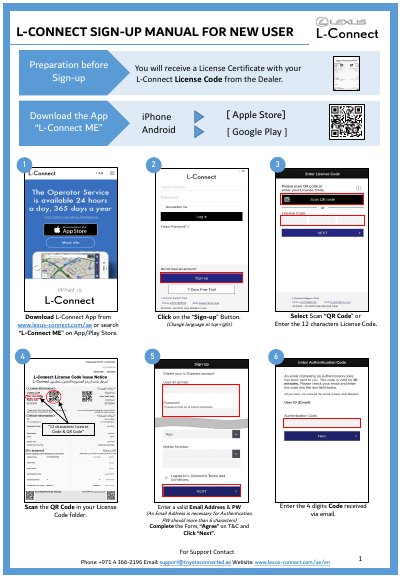
This two-page L-Connect sign-up manual for new users walks through registering the L-Connect ME app. It starts with preparation before sign-up: the user receives a License Certificate with a 12-character License Code from the dealer, then downloads the app from www.lexus-connect.com/ae or by searching "L-Connect ME" on the Apple Store or Google Play.
The guide then describes the sign-up steps: scan the QR code in the License Code folder or type the 12-character License Code, enter the 4-digit code received by email and a valid email address and password, complete the form, agree to the terms and conditions and click "Next". After the registration succeeds, the license and car details are shown and can be edited. Support contact details are listed at the end.
| License Code length | 12 characters |
|---|---|
| Email verification code | 4 digits |
| Password requirement | More than 6 characters |
| App download | www.lexus-connect.com/ae or search "L-Connect ME" on App/Play Store |
| Support phone | +971 4 366-2196 |
| Support email | [email protected] |
Scan the QR code that is in your License Code folder, or enter the 12-character License Code instead.
Download it from www.lexus-connect.com/ae or search "L-Connect ME" on the Apple Store or Google Play.
The email address is needed for authentication and the password should be more than 6 characters.
Call +971 4 366-2196 or email [email protected].