
Lexmark 2200 Series All-In-One User Manual

This manual provides installation, connection, and usage instructions for the Lexmark 2200 Series All-In-One printer, including software setup for Windows…
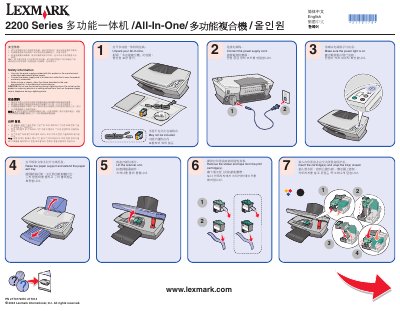

Lexmark 2200 Series All-In-One User Manual - cover page
Brand
Lexmark
Category
Printer
Document type
User Manual
Language
Chinese
Pages
2
File format
PDF
File size
894 KB
Published
14 November, 2026
Updated
14 November, 2026
MD5 checksum
99B69D087A1E8B50A5DEC4CBD8319DCE

About this manual

This document is the user manual for the Lexmark 2200 Series All-In-One printer. It covers safety information, unpacking, and initial setup steps such as connecting the power supply, installing ink cartridges, and preparing the paper tray. The guide includes multilingual instructions (English, Chinese, Traditional Chinese, Korean) for these basic setup procedures. This manual is written in Chinese.

What's inside

  • Safety information
  • Unpack your All-In-One
  • Connect the power supply cord
  • Insert the cartridge(s)
  • Raise the paper support
  • Load paper
  • Connect the USB cable
  • Install the software
  • Windows installation steps
  • Macintosh installation steps
Download PDF (894 KB)

More Lexmark Manuals


View all Lexmark manuals →