
Lance Lab Ltd TC 1 Standard 1 m Snake Camera Quick Start Guide

Quick start guide for the TC 1 Standard 1 m Snake Camera, covering controls, power, recording, photo, file transfer, and safety.
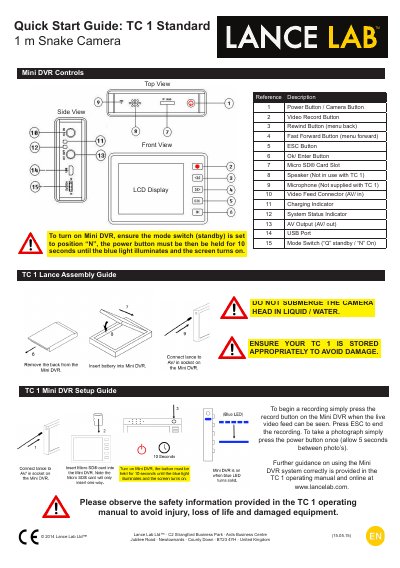

Lance Lab Ltd TC 1 Standard 1 m Snake Camera Quick Start Guide - cover page
Brand
Lance Lab Ltd
Document type
Quick Start Guide
Language
Chinese
Pages
2
File format
PDF
File size
660 KB
Published
17 November, 2026
Updated
17 November, 2026
MD5 checksum
53EE022961F5FA0DC9F9C9AB478C9695

About this manual

This guide explains how to power on the TC 1 camera, start recording or take photos, transfer files via USB, and charge the battery. Safety warnings include not submerging the camera head in liquid or water. The TC 1 Standard includes only the lance; the Mini DVR and accessories are included with the TC 1 Deluxe only. This manual is written in Chinese.

What's inside

  • Power Button / Camera Button
  • Video Record Button
  • Rewind Button (menu back)
  • Fast Forward Button (menu forward)
  • ESC Button
  • Ok/ Enter Button
  • Micro SD® Card Slot
  • Speaker
  • Microphone
  • Video Feed Connector (AV/ in)

Specifications

Battery TypeRechargeable 3.7 V Li - Ion

Frequently asked questions

How do I turn on the TC 1 camera?

Set the mode switch to 'N', then hold the power button for 10 seconds until the blue light illuminates and the screen turns on.

What is the safety warning for the TC 1 camera?

Do not submerge the camera head in liquid or water. Store it appropriately to avoid damage.

Download PDF (660 KB)