
Key facts
- Manuals
- 1
- Languages
- ZH
- Last added
- 2026-11-17
Featured Lance Lab Ltd manuals
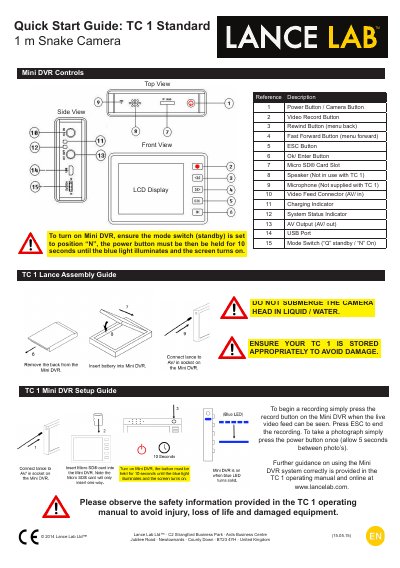
Lance Lab Ltd TC 1 Standard 1 m Snake Camera Quick Start Guide
This guide explains how to power on the TC 1 camera, start recording or take photos, transfer files via USB, and charge the battery. Safety warnings include not submerging the camera head in liquid or water. The TC 1 Standard includes only the lance; the Mini DVR and accessories are included with the TC 1 Deluxe only. This manual is written in Chinese.
Covers: Power Button / Camera Button · Video Record Button · Rewind Button (menu back) · Fast Forward Button (menu forward) · ESC Button · Ok/ Enter Button
Latest Lance Lab Ltd manuals
Lance Lab Ltd TC 1 Standard 1 m Snake Camera Quick Start Guide
Quick Start Guide 2 pages · 660 KB · ZHQuick start guide for the TC 1 Standard 1 m Snake Camera, covering controls, power, recording, photo, file transfer, and safety.
Which document do I need?
Quick Start Guide
The shortest path to a working setup, usually only a few pages.
Questions answered in Lance Lab Ltd manuals
How do I turn on the TC 1 camera?
Set the mode switch to 'N', then hold the power button for 10 seconds until the blue light illuminates and the screen turns on.
From: Lance Lab Ltd TC 1 Standard 1 m Snake Camera Quick Start Guide
What is the safety warning for the TC 1 camera?
Do not submerge the camera head in liquid or water. Store it appropriately to avoid damage.
From: Lance Lab Ltd TC 1 Standard 1 m Snake Camera Quick Start Guide