
KYE Systems Wireless Mouse and Keyboard Kit User Manual

Instructions for installing batteries, connecting the wireless receiver, and operating a KYE Systems mouse and keyboard kit.

KYE Systems Wireless Mouse and Keyboard Kit User Manual - cover page
Brand
KYE Systems
Category
Mouse keyboard
Document type
User Manual
Language
English
Pages
33
File format
PDF
File size
2.1 MB
Published
28 October, 2026
Updated
28 October, 2026
MD5 checksum
3ABBC807616E9588B2F7C9FB4AC67035

About this manual

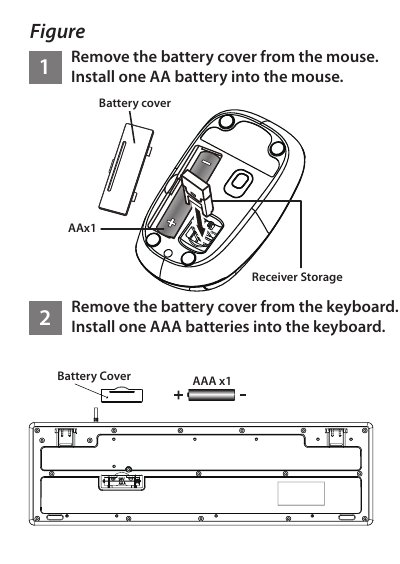
This manual provides step-by-step instructions for setting up the KYE Systems Wireless Mouse and Keyboard Kit. It covers hardware installation, including removing battery covers and inserting AA or AAA batteries into the respective devices. The guide also details how to connect the Pico receiver to a computer's USB port to establish a wireless connection.

What's inside

  • Battery Installation
  • Notes on Battery Usage
  • Mouse Button Assignments
  • Hardware Connection
  • Channel ID Configuration

Frequently asked questions

What type of batteries are required for the mouse and keyboard?

The mouse requires one AA battery, while the keyboard requires one AAA battery.

What is the function of the Magic-Roller button?

The Magic-Roller allows you to scroll through Internet pages and Windows documents.

Download PDF (2.1 MB)

More KYE Systems Manuals


View all KYE Systems manuals →