
This guide covers unboxing, connecting trays and Ethernet, powering on the Kodak ScanStation 100, scanning to USB, and initial system testing.
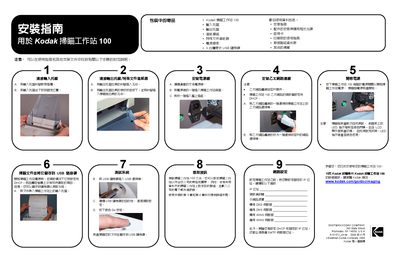
The document serves as an installation guide for the Kodak ScanStation 100. It details the contents of the package, including the scanner unit, input/output trays, paper feed module, and three portable USB drives. The guide provides step-by-step instructions for connecting hardware components such as the input tray, output tray, and Ethernet cable. This manual is written in Chinese.
The package includes the Kodak ScanStation 100, an input tray, an output tray, a paper feed module, a special document feeder, a power cord set, and three portable USB flash drives.
The Ethernet settings are set to DHCP by default, and no selectable items appear on the touch screen when power is first turned on.
Insert the document into the input tray, plug in the USB flash drive, select the destination on the screen, and press the green Go button.