
The Ketaikang POS Machine User Manual explains menu functions, self‑lock checks, common prompts and troubleshooting steps.
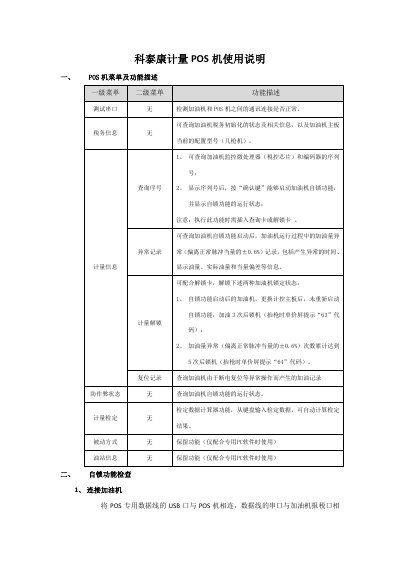
This manual describes the POS machine's menu hierarchy, including primary and secondary menus for testing serial ports, tax information, measurement data, abnormal records, unlocking, reset records, calibration, and station information. It also provides step‑by‑step procedures for connecting the POS to a fuel dispenser, verifying serial numbers, and checking the self‑lock status.
The document lists common prompt messages such as communication timeout, mismatched unlock cards, authentication failures, and encoder errors, along with recommended handling methods. It guides users on how to query abnormal fuel amounts and interpret self‑lock status codes, helping ensure proper operation and compliance with anti‑cheating regulations. This manual is written in Chinese.
| Self‑lock deviation tolerance | ±0.6% |
|---|---|
| Lock code after 3 fills | 63 |
Enter the main menu, select "计量信息" (Measurement Information), choose the sub‑menu "查询序号" (Query Serial Number), and press the confirm key; the POS will display the self‑lock status.
It means the communication channel between the POS machine and the fuel dispenser has failed, possibly due to unreliable cable connections, a faulty dispenser port, or a defective POS unit; troubleshooting should isolate and repair the faulty component.
Insert a matching unlock card, or send the mismatched card to the China Metrology Association for processing before it can be used with the POS.