
Key facts
- Manuals
- 1
- Languages
- ZH
- Last added
- 2026-10-01
Featured 科泰康计量 manuals
Ketaikang POS Machine User Manual
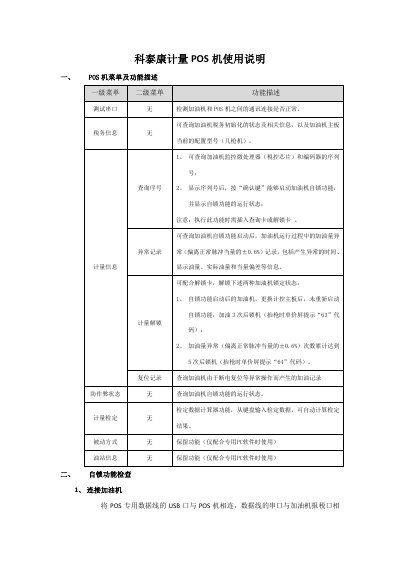
This manual describes the POS machine's menu hierarchy, including primary and secondary menus for testing serial ports, tax information, measurement data, abnormal records, unlocking, reset records, calibration, and station information. It also provides step‑by‑step procedures for connecting the POS to a fuel dispenser, verifying serial numbers, and checking the self‑lock status.
The document lists common prompt messages such as communication timeout, mismatched unlock cards, authentication failures, and encoder errors, along with recommended handling methods. It guides users on how to query abnormal fuel amounts and interpret self‑lock status codes, helping ensure proper operation and compliance with anti‑cheating regulations. This manual is written in Chinese.
Covers: POS Machine Menu and Function Description · Self‑Lock Function Check · Common Prompt Messages and Handling · Serial Number Verification · Abnormal Fuel Amount Records
Latest 科泰康计量 manuals
Ketaikang POS Machine User Manual
User Manual 3 pages · 257 KB · ZHThe Ketaikang POS Machine User Manual explains menu functions, self‑lock checks, common prompts and troubleshooting steps.
Which document do I need?
User Manual
Day-to-day operation, settings and troubleshooting. Start here if the product is already set up.
Questions answered in 科泰康计量 manuals
How can I check the self‑lock status of the POS machine?
Enter the main menu, select "计量信息" (Measurement Information), choose the sub‑menu "查询序号" (Query Serial Number), and press the confirm key; the POS will display the self‑lock status.
What does the "通讯超时" (communication timeout) prompt indicate?
It means the communication channel between the POS machine and the fuel dispenser has failed, possibly due to unreliable cable connections, a faulty dispenser port, or a defective POS unit; troubleshooting should isolate and repair the faulty component.