
This manual details the JK-迅利 II/III operating system parameters, technician and system settings, monitoring functions, and fault codes.
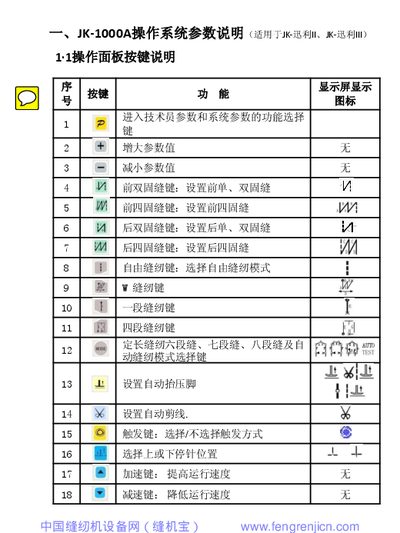
The document provides a complete description of the JK-1000A and JK-2000A operating system parameters for the JK-迅利 II and III sewing machines. It includes button functions on the operation panel, technician and system parameter tables, and the ranges and default values for each setting.
Additional sections cover real‑time monitoring parameters, a comprehensive fault‑code table with troubleshooting steps, and error‑code handling for the controller, motor, and auxiliary devices. The manual also explains how to enter technician or system modes and how to restore factory defaults. This manual is written in Chinese.
| 起缝速度 (Start Sewing Speed) | 100~300 rpm (default 200 rpm) |
|---|---|
| 自由缝最高速 (Max Free Sewing Speed) | 100~5000 rpm (default 3500 rpm) |
| 剪线角度 1 (Cutting Angle 1) | 100~200° (default 175°) |
The universal technician password is “1028”.
In operator mode, hold down the first key, press the second key, and the LCD will display PD‑0000; then enter the technician password.